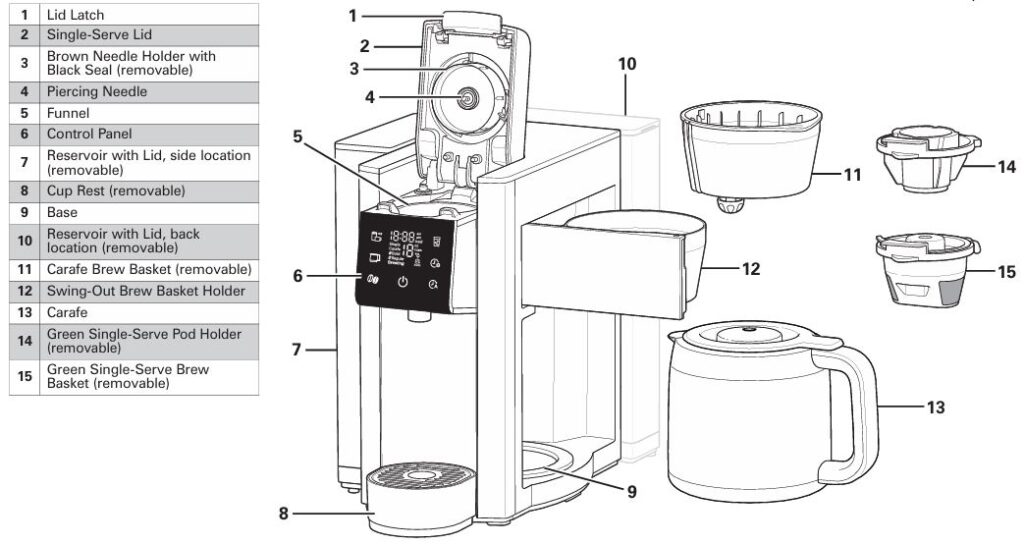
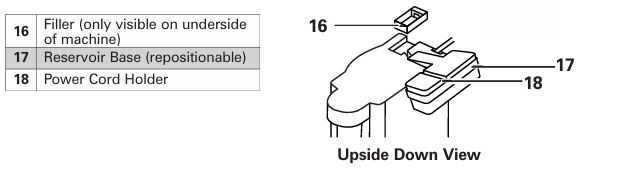
The Hamilton Beach 49929 FlexBrew advanced 5-in-1 brewer is a multifunctional coffee machine that allows you to brew coffee in a variety of ways, including hot single-serve, iced coffee, and traditional carafe brewing. However, like all appliances, it may experience issues during operation.
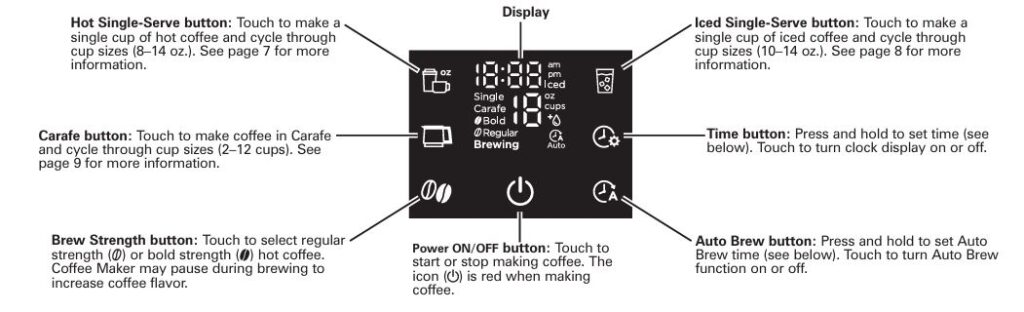
This guide provides step-by-step troubleshooting instructions to help resolve the most common problems, ensuring you can get back to enjoying your coffee hassle-free.
Hamilton Beach 49929 FlexBrew Advanced 5-in-1: Common Issues and Their Solutions
1. Coffee Maker Not Brewing or Coffee Not Dispensing
Possible Causes:
- Bold Mode Pauses Brewing: If you have selected bold mode, the coffee maker may temporarily pause the brewing process to allow the coffee to bloom. This process is normal but may seem like the coffee is not dispensing.
- Clogged Piercing Needle: The piercing needle is responsible for puncturing the coffee pod or grounds during brewing. If it becomes clogged with coffee grounds or other debris, it can prevent the coffee maker from brewing.
- Mineral Deposits: Over time, mineral deposits from hard water can build up inside the coffee maker, restricting water flow and causing brewing problems.
- Too Little Water: The coffee maker requires a minimum amount of water (at least 10 oz) to function properly. If the water level is too low, the brewing process may not start.
Solutions:
- Clean the Piercing Needle: If the coffee maker is not brewing or coffee is not dispensing, it’s likely due to a clogged needle. To clean the needle, remove the Brown Needle Holder from the Single-Serve Lid by turning it counterclockwise. Use a small paper clip to clear any blockage inside the needle. Afterward, run a water-only cycle through the coffee maker to ensure it is functioning properly.
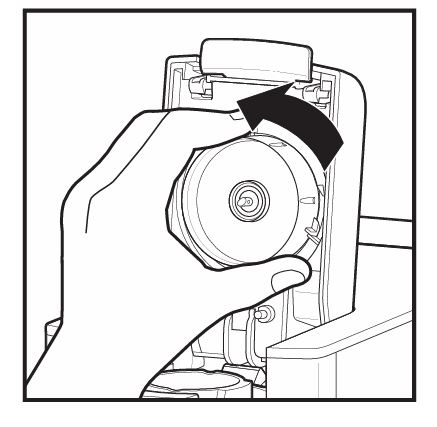
Single-Serve Lid by turning
counterclockwise from locked icon unlocked.
- Descale the Coffee Maker: If mineral deposits have built up, you’ll need to descale the coffee maker. Use a solution of 12 oz white vinegar and 12 oz water, then follow the cleaning instructions in the manual to perform a descaling cycle. This will remove any mineral buildup inside the machine and restore its functionality.
- Ensure Sufficient Water: Always ensure that the water reservoir is filled to at least the 10 oz minimum line. If the water level is too low, the brewing process will not start.
2. Coffee Not Warm Enough or Tastes Bad
Possible Causes:
- Low Coffee Temperature: If the coffee is not hot enough, it could be a sign that the coffee maker’s heating element needs cleaning or that the water temperature is too low.
- Incorrect Coffee-to-Water Ratio: The amount of coffee grounds and water used can directly impact the temperature and taste of the brewed coffee. Using too little coffee or too much water can result in weak, under-extracted coffee.
- Poor Water Quality: The quality of water used in brewing can significantly affect the taste of your coffee. Hard water or unfiltered water may lead to off-tasting coffee.
Solutions:
- Clean the Coffee Maker: If your coffee is not hot enough, the issue might be mineral deposits affecting the heating element. Run the cleaning cycle with a vinegar solution to remove any buildup.
- Adjust the Coffee-to-Water Ratio: For better flavor, use the recommended amount of coffee. Typically, 1 tablespoon (5 grams) of ground coffee per cup is ideal. If the coffee tastes weak, try increasing the amount of coffee or reduce the water used.
- Use Filtered Water: If your coffee tastes bad, consider switching to filtered or bottled water. Hard or unfiltered water can result in poor extraction, leading to weak or unpleasant coffee.
3. Water Spilling or Leaking from the Coffee Maker
Possible Causes:
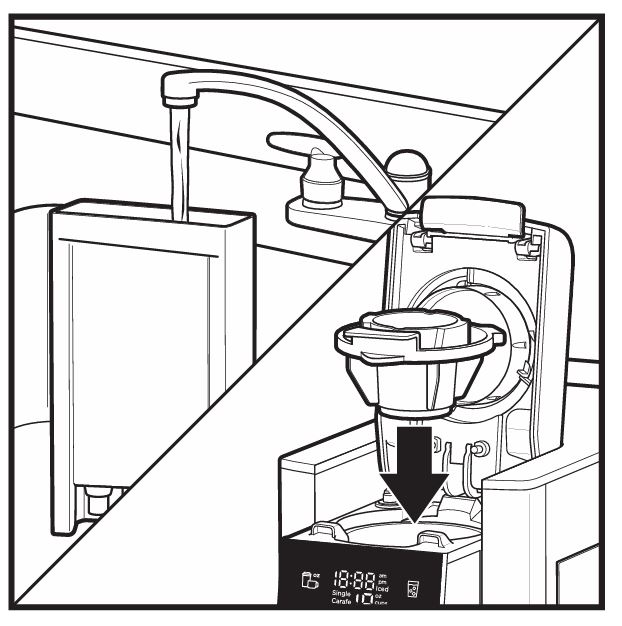
- Overfilled Reservoir: If the water reservoir is filled beyond the maximum capacity (60 oz), water may spill out during brewing.
- Improper Placement of the Carafe: If the carafe is not placed correctly on the base, it can cause water to leak during the brewing process.
- Faulty Seal or Gasket: A missing or worn-out gasket around the needle or the carafe lid can cause water to leak.
Solutions:
- Check the Water Reservoir: Ensure the water reservoir is filled only up to the MAX fill line (60 oz). Overfilling can cause water to spill out during brewing.
- Properly Position the Carafe: Always ensure the carafe is correctly seated on the base before starting the brew cycle. If the carafe is misaligned, it may cause leakage.
- Replace Faulty Seals: If there are leaks from the needle or the carafe lid, check for any missing or damaged seals. If necessary, replace the seals to prevent further leaks.
4. Coffee Overflowing from the Brew Basket
Possible Causes:
- Excessive Coffee Grounds: Using too much coffee grounds, especially if they are ground too finely, can cause overflow during brewing.
- Missing or Damaged Seal: The seal around the needle or the brew basket can sometimes become worn out, causing improper brewing.
- Improper Placement of the Brew Basket: If the brew basket is not positioned correctly, it can lead to overflow.
Solutions:
- Reduce Coffee Grounds: Always use no more than 3 tablespoons (15 g) of ground coffee per single-serve brew. If you’re using a pod, make sure it fits properly into the holder.
- Check the Needle Seal: Make sure the black seal around the Brown Needle Holder is in place. If the seal is missing or damaged, replace it to prevent overflow.
- Use Coarse Ground Coffee: If you are using ground coffee, make sure the grind is not too fine. Fine coffee grounds can clog the needle and cause overflow. Use a medium or coarse grind for optimal results.
5. Control Panel Not Responding or Displaying Errors
Possible Causes:
- Loose Lid: If the lid is not securely closed, the coffee maker will not begin brewing.
- Clogged Needle: The “nEEdLE” error often appears if the needle is clogged with coffee grounds.
- Insufficient Water: If the “Add Water” message appears, the water reservoir is empty or below the minimum level.
Solutions:
- Ensure Lid is Properly Closed: Always make sure the lid is securely locked into place before starting the brew cycle. If the lid is open, the coffee maker will not brew.
- Clean the Needle: If you receive the “nEEdLE” error, remove the Brown Needle Holder and clean the piercing needle using the method described above.
- Add Water: If the “Add Water” message appears, check the water level and ensure the reservoir is filled with at least 10 oz of water.
6. Coffee Overflowing from a Travel Mug or Regular Mug
Possible Causes:
- Overfilled Mug: If the travel mug or regular mug is too full or too large, it may cause coffee to overflow.
- Stopping the Brew Cycle Early: Interrupting the brewing cycle prematurely can cause overflow.
Solutions:
- Choose the Right Mug Size: Always use a mug or travel cup that fits properly on the coffee maker’s cup rest. The mug should not be too full to prevent overflow.
- Wait for the Brewing Cycle to Finish: Allow the brewing cycle to complete before attempting to remove the mug or travel cup. Stopping the cycle early can lead to overflow.
7. Single-Serve Pod Bursts
Possible Causes:
- Weak Pods: Some single-serve pods may have weak seams, causing them to burst during brewing.
- Water Softness: Softened water can sometimes cause issues with single-serve pods and lead to brews that overflow or pods that burst.
Solutions:
- Try a Different Brand of Pods: If your current pods are consistently bursting, consider switching to a different brand of coffee pods.
- Use Filtered Water: To avoid pod bursting and overflow issues, use filtered, bottled, or spring water instead of softened water.
Frequently Asked Questions (FAQs)
How do I clean the Hamilton Beach 49929 FlexBrew Coffee Maker?
To clean the coffee maker, fill the reservoir with a mixture of 12 oz white vinegar and 12 oz water. Follow the cleaning steps as described in the user manual.
Why is my coffee maker making a high-pitched sound?
The high-pitched sound may be due to a clogged needle, an open lid during brewing, or excessive fine-ground coffee. Clean the needle and ensure the lid is securely closed during brewing.
How can I prevent coffee overflow?
Ensure you are using the correct amount of coffee grounds, not exceeding the maximum fill line. Avoid using finely ground coffee, which can cause overflow.
Can I use regular coffee filters with the Hamilton Beach 49929 FlexBrew?
Yes, you can use a #1 paper cone filter in the Single-Serve Brew Basket if you are using ground coffee.
Conclusion
With the troubleshooting steps and solutions provided in this guide, you should be able to resolve the common issues with your Hamilton Beach 49929 FlexBrew Advanced 5-in-1 coffee brewing machine. Regular maintenance, cleaning, and proper usage will ensure that your coffee maker serves you well for years to come. If the problem persists, don’t hesitate to contact Hamilton Beach’s customer support for further assistance.

0 Comments