Before you troubleshoot, it helps to know what this machine actually does.
The 7 core functions
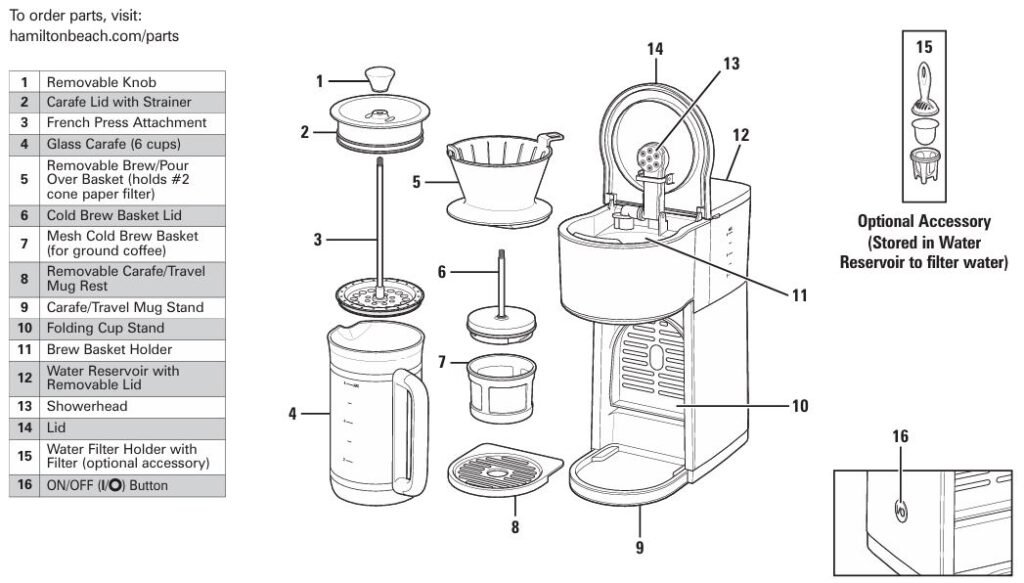
Your 46251 Home Barista can brew:
- Drip coffee into the glass carafe (up to 6 “cups” / 30 oz / 887 mL)
- Single-serve drip into a mug
- Single-serve drip into a travel mug
- Iced coffee (extra-strong brew directly over ice)
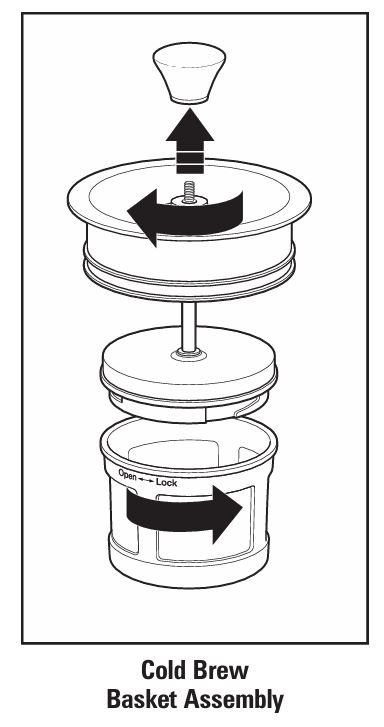
- Cold brew using the mesh cold-brew basket
- French press coffee using the French press attachment
- Manual pour-over coffee using the same cone basket off the machine
All of these modes share the same water reservoir, basket system, lid, and carafe, which is why many problems show up the same way (weak coffee, overflow, etc.).
Before You Start: Safety & Quick Checks
“If the appliance malfunctions or has been dropped or damaged in any manner… repairs must be conducted by the manufacturer, its service agent, or similarly qualified persons.”
Basic safety rules
- Unplug the coffee maker before cleaning or troubleshooting internal parts.
- Never immerse the base, cord or plug in water.
- Do not open the housing – there are no user-serviceable parts inside.
- Do not use a cracked or chipped carafe or one with a loose handle.
- Always keep the coffee maker on a flat, stable counter away from the edge to prevent tipping.
Quick pre-check list
Before diving into detailed fixes, run through these:
- Is the unit firmly plugged into a working outlet?
- Is the water reservoir filled at least to the lowest marking? (The unit won’t brew with an empty reservoir.)
- Is the lid fully closed and the brew basket seated correctly?
- Is the carafe, mug or travel mug sitting flat and centered on the stand or cup rest?
- Has it been cleaned in the last month, or weekly if you have hard water?
If all of that looks good, jump to the problem that best matches what you’re seeing.
Problem 1 – Coffee Maker Will Not Brew
Symptoms
- You press the I/ (ON/OFF) button and nothing happens.
- The button doesn’t illuminate.
- The reservoir is full but no water is pulled through.
Step-by-step diagnosis
1. Confirm power and outlet
- Check that the plug is fully inserted.
- Make sure you’re using a standard polarized outlet—the plug has one wider blade for safety and must be inserted the correct way.
- Quickly test the outlet with another small appliance (e.g., a phone charger).
If the outlet is dead, reset your breaker or use a different outlet.
2. Check the water reservoir
The manual is very clear:
“If there is no water in the Water Reservoir and I/ Button is pressed, unit will not brew.”
- Remove the reservoir lid and visually confirm water level.
- Fill to at least the 2-cup or 4-cup line, depending on how much you’re brewing.
- Replace the lid securely; the machine is designed to operate with the lid closed.
3. Confirm basket and lid are correctly installed
- Remove and reseat the Brew/Pour Over Basket.
- Check that the basket holder is aligned and pushed fully back.
- Close the top lid firmly—an incompletely closed lid can interfere with normal operation.
4. Let the unit cool if it was recently overheated
If the machine overheated due to a dry run or blocked basket, an internal safety thermostat may temporarily shut it down.
- Turn the machine OFF.
- Unplug it and let it cool for 15–30 minutes.
- Refill the reservoir, ensure the basket is clear, and try again.
If the unit still won’t brew after all this, do not open the case. Contact Hamilton Beach customer service as the manual directs.
Problem 2 – Water or Coffee on the Counter
Symptoms
- You notice water pooling under or around the base.
- There are drips on the counter after brewing.
Likely causes
According to the troubleshooting chart, water on the counter under the unit is usually caused by overfilling the water reservoir.
1. Check the MAX fill line
- The water reservoir has a 6-cup MAX line.
- Filling above this can make water spill from the top or internal overflow channels during brewing.
Fix:
Drain the reservoir, refill only up to the 6-cup mark, and brew again.
2. Inspect carafe placement
- Ensure the carafe or mug is centered on the stand.
- Check that the carafe lid is fitted correctly, with the strainer aligned with the handle when brewing into the carafe.
If the lid is misaligned, coffee can run down the side and onto the counter.
3. Look for cracks or damage
- Inspect the glass carafe for hairline cracks, chips or a loose handle.
- If damaged, stop using it immediately—the manual instructs you to discard a cracked or scratched carafe to avoid sudden breakage.
Problem 3 – Coffee Tastes Bad, Sour, Burnt or “Off”
Common causes
From the official guide: poor taste is usually related to dirty internals, grind size, water quality, or stale coffee.
1. The machine probably needs descaling
Mineral buildup inside the heating system will:
- Slow water flow
- Change brew temperature
- Make coffee taste flat or metallic
The manufacturer recommends cleaning at least once a month—and weekly in hard-water areas.
How to descale with white vinegar
- Empty the reservoir.
- Fill with plain white vinegar to the 2-cup fill line and replace the lid.
- Place the carafe with lid on the stand.
- Press I/ to start a brew. Once vinegar begins dispensing, press I/ again to pause and let it soak inside for 30 minutes.
- Press I/ a second time to finish the cycle; empty the carafe.
- Repeat the process twice more using plain water (no vinegar) to rinse thoroughly.
Pro tip: If you see white scale or residue in the reservoir, you may want to run an extra plain-water cycle.
2. Use the correct grind and amount
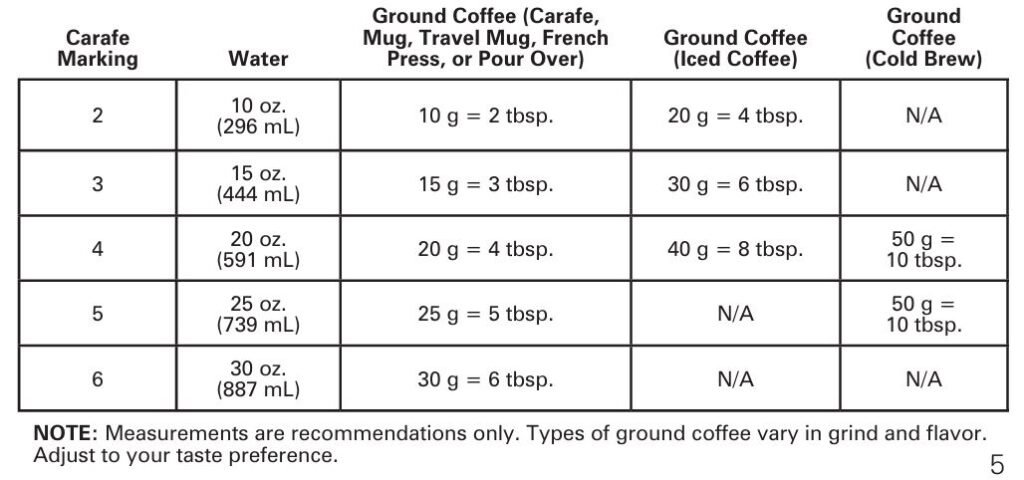
The manual recommends about 1 tablespoon (5 g) of coffee per “cup” for regular drip brewing.
- Use a medium grind for drip and pour-over.
- Use coarse for the French press and cold brew basket.
- Overly fine grinds can make coffee bitter and can also cause overflow.
3. Improve water and bean quality
- If your tap water is very soft or tastes odd, use filtered, spring or bottled water. Soft water can lead to poor extraction and poor-tasting coffee.
- Avoid old or pre-ground coffee with an expired date.
- Store beans in an airtight container at room temperature (not in the freezer, which the manual warns against for grounds).
Problem 4 – Weak Coffee (All Modes)
A. Weak drip coffee into carafe or mug
Causes & fixes:
- Too much water / too little coffee
- Use 1 tablespoon (5 g) per cup. If it’s still weak, slightly increase the coffee or reduce the water.
- Grind too coarse
- Choose a medium drip grind on your grinder.
- Old or low-quality beans
- Try a fresh bag of beans or a different roast.
B. Weak iced coffee
For iced coffee, you brew double-strength over ice.
- Use 2 tablespoons (10 g) per cup, with no more than 10 tablespoons (50 g) total in the basket.
- Fill the reservoir only to the 4-cup line and the carafe with ice to the 4-cup mark.
If you under-dose the coffee or add too much water, the ice will dilute it heavily.
C. Weak cold brew
The troubleshooting chart notes:
“Coffee not strong: Use a finer grind coffee and/or increase steeping time in refrigerator.”
- Ensure you’re adding up to 50 g of coffee in the cold-brew basket with water filled to the 5-cup line.
- Steep at least 12 hours and no more than 24 hours in the fridge.
- If it’s still weak, use slightly finer grounds (but not espresso-fine) or increase the coffee amount to the full 50 g.
D. Weak French press coffee
The manual suggests adjusting the water/coffee ratio or type of coffee if the French press brew isn’t strong.
- Use 1 tablespoon (5 g) of coarsely ground coffee per 5 oz (147 mL) of water.
- Steep for 4 minutes before pressing.
E. Weak pour-over coffee
For pour-over, several factors can make it taste thin:
- Water not hot enough – should be around 195–205°F (90–95°C).
- Too much water – reduce the amount used.
- Grind too fine or pouring too fast without bloom.
- Let the coffee bloom for 30 seconds after the first pour, then continue slowly.
Problem 5 – Coffee Too Strong or Bitter
Drip / carafe modes
The manual lists these main reasons:
- Too much ground coffee
- Not enough water (max 30 oz / 887 mL)
- Machine needs cleaning
- Incorrect grind size
Fix it:
- Slowly reduce the dose of coffee per cup until flavor is balanced.
- Verify you’re filling the reservoir appropriately. Don’t exceed 30 oz (887 mL) but also don’t drastically under-fill for the amount of coffee.
- Run a descale cycle (see Problem 3).
- Ensure the grind isn’t too fine, which can over-extract and taste harsh.
Problem 6 – Filter Basket or Carafe Overflow
This can occur in drip, single-serve, iced coffee, French press or pour-over modes if you’re not careful with grind and volume.
Common triggers
- Too fine or too much coffee, especially decaf or flavored varieties.
- Too much water in the reservoir, especially for iced coffee.
- Not draining the mug or travel mug between interrupted cycles.
A quick overflow decision tree
1. Are you using decaf or finely ground coffee?
The manual repeatedly warns that decaf and finely ground coffee can cause overflow and recommends using slightly less coffee or a medium grind.
- Switch to medium grind.
- Reduce the scoop count by 10–20% and test again.
2. Did you exceed the recommended coffee quantity?
- For regular drip: 1 tbsp (5 g) per cup.
- For iced coffee: up to 10 tbsp (50 g) maximum.
3. Did you exceed the water limit?
- Standard drip: never above the 6-cup MAX line.
- Iced coffee: never above the 4-cup line.
4. For single-serve mug / travel mug:
- The manual advises: if you stop a brew early, you must drain the mug before restarting, or the next cycle can overflow.
Technician tip: If an overflow occurs, unplug the machine and allow the hot coffee in the basket to cool before removing it to avoid burns.
Problem 7 – Iced Coffee Overflowing the Carafe
Symptoms
- Coffee spills over the top of the carafe when making iced coffee.
Specific causes (from the manual)
- Too much ice in the carafe.
- Too much water in the reservoir – more than the 4-cup iced-coffee line.
Fix:
- Fill the carafe with ice only to the 4-cup line.
- Add cold water to the reservoir only to the 4-cup fill line.
- Use a maximum of 10 tablespoons (50 g) of coffee in the filter basket.
Problem 8 – Cold Brew Coffee Not Strong Enough
Step-by-step for stronger cold brew
- Check the ratio
- Add up to 50 g (10 tbsp) of ground coffee to the mesh cold-brew basket.
- Fill the carafe with cold water to the 5-cup line.
- Use the right grind
- The manual suggests moving to a finer grind (still coarser than espresso) if the brew is weak.
- Steep long enough
- Refrigerate for at least 12 hours and no more than 24 hours.
- Agitate the grounds properly
- Slide the cold-brew basket up and down in the water until it becomes a cloudy brown—this ensures full saturation.
Pro tip: Treat cold brew as a concentrate. If you prefer stronger flavor, drink it over less ice or dilute with less water or milk.
Problem 9 – French Press Issues (Hard to Press or Not Strong)
A. Plunger hard to push / clogged
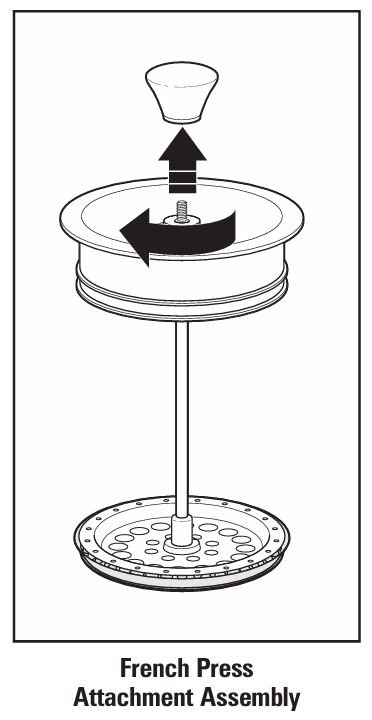
The manual explains: if the attachment is hard to push or the bottom is clogged, you should remove it, stir the coffee, and reinsert.
Checklist:
- Are you using coarsely ground coffee? Fine grounds will clog the mesh.
- Are you gently pressing straight down, not at an angle?
- Is the French press assembly properly put together (spring, mesh, plates in order)? The assembly guide on page 9/19 shows the correct stacking of parts.
B. French press coffee too weak
The troubleshooting section notes:
“French Press not strong: Use a different coffee and/or adjust water/coffee ratio by using slightly less water and/or more grounds.”
- Use 1 tablespoon (5 g) coarse coffee per 5 oz (147 mL) of water.
- Increase the steep time up to 4 minutes before pressing.
Problem 10 – Pour-Over Coffee Not Strong or Flat
Symptoms
- Tastes watery or under-extracted.
- Looks pale with little aroma.
Manual-based causes and fixes
From the pour-over troubleshooting:
- Water temperature too low
- Ensure water is at least 185°F (85°C), ideally 195–205°F (90–95°C).
- If you’ve boiled water, let it sit about 1 minute before pouring.
- Too much water
- Reduce the total water volume for the same coffee dose.
- Grind too fine
- Interestingly, very fine grinds can slow flow but still yield dull flavor. Move to a slightly coarser grind.
- Not allowing the “bloom”
- Slowly wet the grounds, then wait 30 seconds before continuing the pour.
- Continue pouring in slow circles, maintaining only a thin layer of water on top.
Problem 11 – Sediment in Your Cup or Carafe
Why it happens
The manual explains that sediment can result when using fine grounds.
Fixes
- Use a coarser grind, especially for drip and cold brew.
- Ensure your #2 paper filter is seated correctly in the basket.
- For French press, sediment is normal, but coarser grind and slow pressing reduce it.
Problem 12 – Routine Cleaning & Water Filter Issues
A. Routine cleaning schedule
The official recommendation:
- Clean the coffee maker at least once a month, or once a week if you have hard water.
Besides the descaling steps earlier, you should:
- Unplug and cool completely.
- Wash all removable parts (carafe, lid, brew basket, cup stand, French press parts, cold brew basket) in hot, soapy water or the top rack of the dishwasher.
- Avoid the “SANITIZE” cycle in a dishwasher—temperatures may damage the plastic.
- Wipe the exterior with a damp cloth, not abrasive pads.
B. Water filter (optional accessory)
If you’re using the optional water filter that stores in the reservoir:
- Soak a new filter in cold water for 15 minutes.
- Place it in the bottom half of the filter holder and snap the top on.
- Insert the holder into the opening at the bottom of the reservoir.
- Replace it about every 3 months, or more often with hard water.
A clogged or exhausted filter can restrict water flow and affect taste.
Quick Reference Troubleshooting Tables
Common Problems & Root Causes
| Problem / Symptom | Likely Cause | Quick Fix |
|---|---|---|
| Machine won’t brew | No water in reservoir; unit overheated; plug loose | Fill to appropriate line; reseat plug; cool and retry |
| Water on counter under machine | Reservoir filled above 6-cup MAX line | Drain and refill only to MAX line |
| Coffee tastes bad or metallic | Buildup of mineral deposits; poor beans; bad water | Run vinegar clean cycle; use fresh beans and filtered water |
| Coffee too weak (drip) | Too much water / too little coffee; grind too coarse | Use 1 tbsp (5 g) per cup; adjust grind |
| Coffee too strong / bitter | Too much coffee; not enough water; grind too fine; dirty machine | Reduce coffee dose; use medium grind; clean machine |
| Filter basket overflow | Too much coffee; decaf or fine grind; too much water | Use less coffee, medium grind; respect MAX lines |
| Iced coffee overflowing | Too much ice or water above 4-cup iced line | Reduce ice; fill reservoir only to 4-cup line |
| Cold brew not strong | Grind too coarse; steep time too short | Use slightly finer grind; steep 12–24 hours |
| French press hard to press | Using fine grind; plunger clogged or misassembled | Use coarse grind; disassemble, clean and reassemble correctly |
| Pour-over weak | Water not hot; grounds not bloomed; too much water | Heat water to 195–205°F; bloom 30 sec; reduce water |
(All causes and limits derived from the Hamilton Beach 46251 user guide.)
When to Stop DIY and Call Hamilton Beach Support
You should stop using the coffee maker and contact Hamilton Beach if you notice:
- Cracked or broken glass carafe or a loose handle.
- Damaged power cord or plug.
- Smoking, burning smell, or repeated tripping of your circuit breaker.
- Internal leakage that doesn’t match simple overfilling or mis-placement issues.
- The I/ button doesn’t function at all even after verifying outlet and water.
The manual clearly states that repairs must be performed by the manufacturer, its service agent, or similarly qualified persons and that users must not remove covers or attempt internal repair.
Frequently Asked Questions (FAQs)
How much coffee should I use in the Hamilton Beach 46251?
For standard drip brewing into the carafe or mug:
- Use 1 level tablespoon (5 g) of ground coffee per cup of water.
For iced coffee:
- Use 2 tablespoons (10 g) per cup, up to 10 tablespoons (50 g) maximum.
For cold brew:
- Up to 50 g (10 tbsp) in the cold-brew basket with water to the 5-cup line.
Why does my coffee maker suddenly stop brewing during a cycle?
Possible reasons:
- The reservoir ran dry (if you misjudged the amount of water).
- The filter basket clogged, especially with fine or decaf coffee, causing the thermal protector to activate.
- A momentary power interruption.
Allow the unit to cool for 15–30 minutes, clean the basket, and brew again.
How often should I descale my Hamilton Beach 46251?
At minimum once a month, and once a week if you live in an area with hard water.
Can I put the carafe or accessories in the dishwasher?
Yes. The manual says all removable parts are dishwasher-safe, but do not use the “SANITIZE” setting, which can get hot enough to damage them.
Why is there sediment in the bottom of my mug even with a paper filter?
You’re likely using grounds that are too fine. The manual notes that sediment can occur with fine grinds and recommends using a coarser grind.
Can I use the carafe on the stove or in the microwave?
No. The carafe is meant only for the coffee maker’s warming plate (when applicable) and must not be used on a stovetop or in a microwave.
My cold brew tastes sour. What should I change?
Sour cold brew usually means under-extraction:
- Increase the steep time up to the maximum of 24 hours.
- Use a slightly finer grind or a bit more coffee.
- Ensure the basket is fully saturated (slide it up and down in the water during setup).
Can I make tea or hot water in this machine?
While the manual focuses on coffee, you can technically run plain hot water through the system into a mug. Just remember that internal parts are seasoned with coffee oils, so the flavor may not be neutral.
Why does the I/ button light go out after brewing?
That’s normal. The 46251 automatically shuts itself off when the brewing cycle is complete for safety and energy savings.
Is it safe to store the coffee maker in a cabinet and use it there?
The manual explicitly warns not to place the coffee maker in a cabinet while in use, due to heat and steam build-up.
Final Technician Tips for Long-Term Reliability
- Respect the fill lines (4-cup for iced coffee, 6-cup MAX generally).
- Stick to medium grind for regular drip, coarse for French press and cold brew.
- Avoid forcing the French press plunger; if it resists, pull it back up, stir, and try again.
- Clean spills and the warming area quickly to avoid baked-on residue.
- Replace the optional water filter every 3 months if you use it.
Troubleshooting User Guide – Free Download Manual
With proper maintenance and by following the troubleshooting steps above, your Hamilton Beach 46251 Home Barista 7-in-1 Coffee Maker should deliver consistent drip, cold brew, iced coffee, French press and pour-over for years—without the daily drama of leaks, overflow or weak coffee.

0 Comments