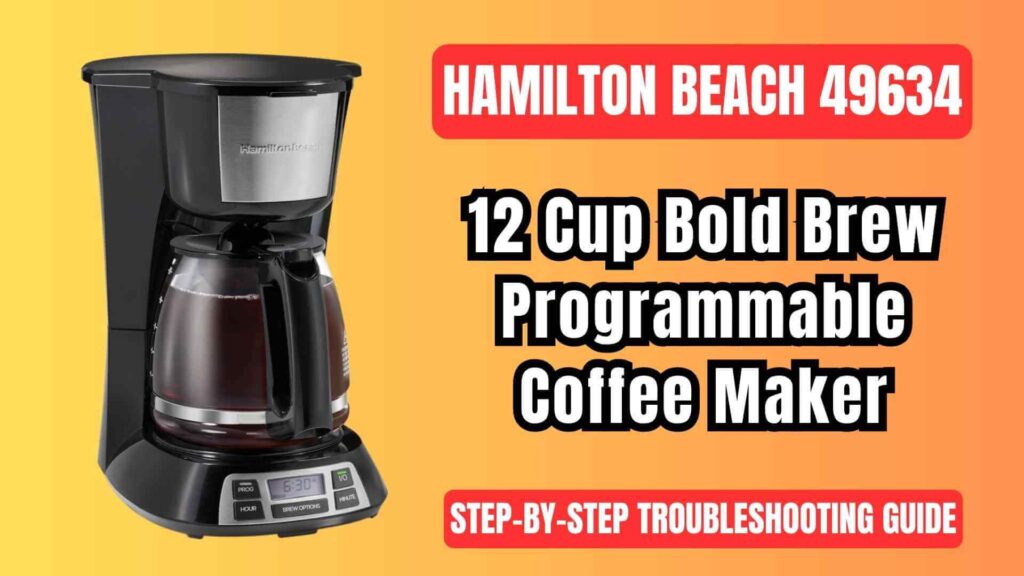
If your Hamilton Beach 49634 Bold Brew 12-Cup Programmable Coffee Brewer is overflowing, brewing too slowly, not turning on, tasting off, or refusing to follow its programmed schedule, you’re in the right place.
Speaking as an appliance repair tech: this model is reliable when used and maintained correctly. Most “errors” are not electronic faults—they’re setup, cleaning, or usage issues that we can fix at home in a few minutes using the same logic and procedures recommended in the official documentation.
This guide is:
- Based on the official use & care instructions for models 49630–49634 (including Bold Brew variants), translated into plain, practical troubleshooting steps.
- Written to help you decide what you can safely fix yourself and when to contact support.
Before You Start: Safety, Setup & Smart Checks
Safety First (Do NOT Skip)
Always:
- Unplug the coffee maker before cleaning, checking underneath, or removing stuck parts.
- Keep it on a flat, stable surface, away from the edge.
- Never immerse the base, cord, or plug in water—only removable parts can be washed.
- Use only the original glass carafe and never place it on a stove or in an oven/microwave.
- Don’t defeat the polarized plug and avoid sharing the circuit with many high-wattage appliances.
“If you’re unsure whether it’s safe—unplug first, then decide.”
Quick Pre-Check: Fix 30% of Issues in 30 Seconds
Before deep troubleshooting, verify:
- Outlet works (test with another appliance).
- Unit is fully plugged in.
- Water reservoir has enough water.
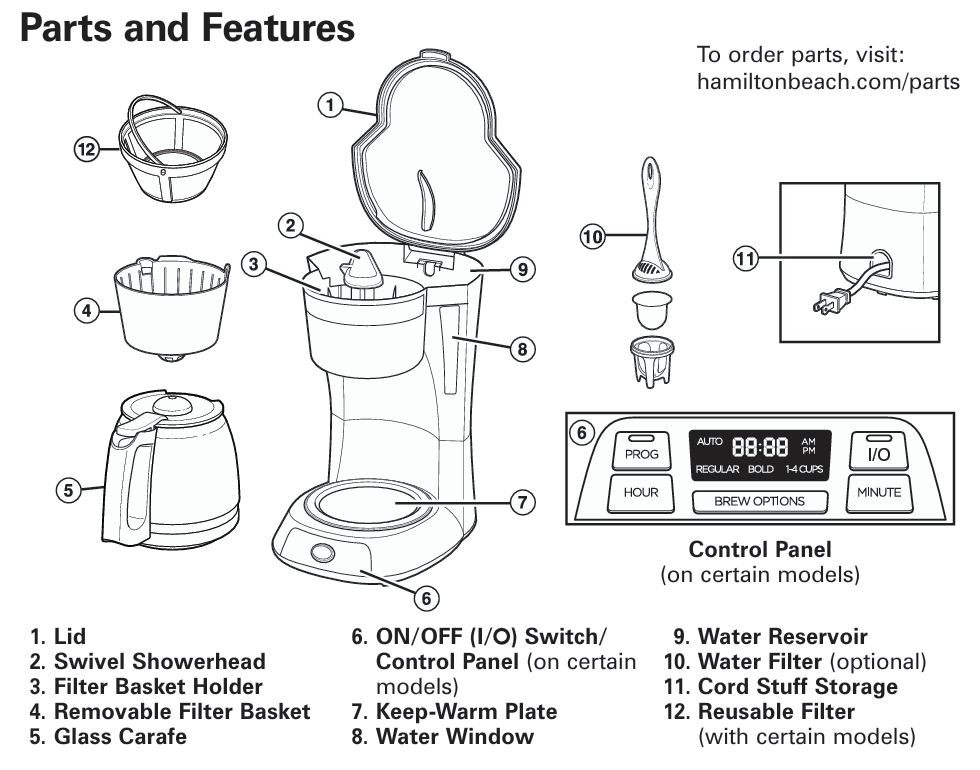
- Carafe is seated flat on the keep-warm plate.
- Filter basket is inserted correctly and lid is fully closed.
- You’re not exceeding the 12-cup capacity.
If any of these is wrong, the coffee maker may act “dead,” overflow, or stop mid brew.
Problem–Solution Table (At a Glance)
| Symptom | Likely Cause | Quick Fix |
|---|---|---|
| No brewing / won’t turn on | No power, empty reservoir, clock not set (auto), surge | Check outlet, fill tank, reset time, unplug/replug |
| Basket overflows / brews very slowly | Too fine/too much coffee, decaf, dirty unit, filter issue | Adjust grind/amount, reposition filter, run cleaning cycle |
| Coffee tastes bad / weak / bitter | Wrong ratio, poor water, dirty machine | Use fresh medium grind, filtered water, descale |
| Bold Brew seems “wrong” | Misunderstanding feature, using too fine/too much grind | Expect slower brew; adjust grounds and paper filter |
| Leaking under unit / dripping around carafe | Overfilled tank, misaligned carafe, spill, condensation | Check levels, position carafe, clean surfaces |
| Auto Brew not working | Program not confirmed, clock reset after outage | Reset clock, re-set PROG, confirm indicator is on |
| Stops mid brew / only steam | Scale buildup, partial clog, incorrect assembly | Descale, reseat basket & showerhead |
| Hot plate not hot / shuts off | Auto shutoff (2 hours), switch off too soon | For clock models: normal; for switch models: turn ON manually |
(We’ll break each scenario down in detail below.)
3. Coffee Maker Not Brewing / Won’t Turn On
Basic Electrical & Setup Checks
If your Hamilton Beach 49634 won’t start:
- Confirm power
- Test the outlet with another device.
- Make sure plug is fully inserted (polarized plug fits only one way).
- Check the water reservoir
- If it’s empty, the unit won’t brew. Fill up to your desired level (not past 12-cup marking).
- Check power button behavior
- For programmable/clock models:
- Press the I/ (On/Off) button once. A light should illuminate, indicating brewing or power on.
- For simple switch models:
- Rock the switch to ON (I). Light = ON.
- For programmable/clock models:
- Look for post-surge lockup
- After a power surge or outage, the electronics may need a reset:
- Fix: Unplug for 1–2 minutes → plug back in → reset clock if needed → try brewing again.
If Auto Brew (Program) Is Not Working
Common mistakes:
- Clock time is wrong.
- PROG time is set but not “armed.”
- Unit lost power and forgot settings.
Steps to Fix
- Set the clock
- Press HOUR, then MINUTE until current time is correct.
- Program Auto Brew
- Hold PROG, use HOUR/MINUTE to set your desired brew time.
- Release PROG briefly (less than 1 second) to activate Auto Brew.
- Look for the indicator showing the program is enabled.
- Verify
- Water in reservoir, coffee and filter loaded, carafe in place, lid closed.
- If Auto Brew still doesn’t start even though the PROG light is on and all conditions are correct, that may indicate a control board or sensor fault—time to contact Hamilton Beach support.
4. Filter Basket Overflowing or Brewing Too Slowly
This is the most common complaint with the Bold Brew series—and it’s almost always fixable without repair.
Why It Happens
Key causes (all documented by the manufacturer and confirmed in the field):
- Too much coffee or ultra-fine grind.
- Using decaf or flavored coffee with the same dose as regular.
- Paper filter folded, collapsed, or poor quality.
- Coffee grounds trapped between the paper filter and basket wall.
- Coffee maker needs descaling/cleaning.
- Carafe removed too long during Pause ’N Serve.
- Bold setting slowing brew with an overloaded basket.
Step-by-Step Fix
Step 1: Stop Safely
- If it’s currently overflowing:
- Turn unit OFF.
- Unplug.
- Let basket cool before removing to avoid burns.
Step 2: Check Filter & Grounds
- Use a #4 basket-style paper filter or the included permanent filter (if your unit has it).
- Make sure:
- Filter is fully opened and pressed into place.
- No grounds are stuck between the paper and plastic.
- You’re not using flimsy low-quality filters prone to collapse.
Recommended dosing:
- Standard: ~1 level tablespoon (≈5 g) per 6 oz cup.
- For 12 cups: about 12 Tbsp (not heaping).
- If using decaf, flavored, or fine grind, reduce slightly (e.g., 10 Tbsp for 12 cups).
Step 3: Check Pause ’N Serve Use
- You can remove the carafe mid brew, but:
- Do NOT exceed 20 seconds.
- Longer pauses can cause the basket to fill and overflow.
Step 4: Clean & Descale (if slow flow)
Mineral buildup chokes internal tubing and slows the brew, leading to overflow.
Follow the descaling guide in Section 7 below.
If after proper filter use and descaling it still overflows on normal settings with moderate grounds, the brew valve or basket may be defective—time for service evaluation.
5. Coffee Tastes Weak, Bitter, Burnt, or “Off”
Taste problems are usually not hardware failures.
Weak or Watery Coffee
Possible reasons:
- Too little coffee for the amount of water.
- Grind too coarse.
- Not using Bold for small batches when desired.
Fix:
- Use about 1 Tbsp per cup.
- For 1–4 cups, consider using the 1–4 cup option if available on your model for better extraction.
- Use medium grind; extremely coarse grind under-extracts.
Bitter, Burnt, or Chemical Taste
Causes:
- Scale buildup.
- Using very fine espresso grind (over-extraction).
- Old coffee, poor water quality.
- Brewed coffee left on hot plate for too long.
Fix:
- Descale (see Section 7).
- Use fresh coffee and filtered/bottled water for best flavor.
- Use medium grind, not espresso fine.
- Don’t leave coffee heating for extended hours; many clock models auto-shut off after 2 hours by design.
6. Bold Brew Setting Issues
“Bold Brew is too slow” (Actually Working as Designed)
The Bold setting deliberately slows the brewing cycle to increase contact time between water and grounds for a richer flavor.
Normal behavior:
- Longer brew time.
- Slightly hotter or stronger-tasting coffee (perceived).
- Louder dripping at times—still normal.
When Bold Causes Problems
If you’re using:
- Very fine grind, or
- Too much coffee, or
- Decaf/flavored coffee,
the slower Bold flow can cause the basket to fill faster than it drains.
Solution:
- Use medium grind.
- Slightly reduce coffee amount when using Bold.
- Ensure correct #4 basket filter placement.
- If overflow persists only on Bold but not on Regular, keep using Regular or reduce grounds further.
7. Detailed Descaling & Cleaning Guide
(Critical for Slow Brew, Off Taste, Overflow & Mid-Cycle Stopping)
To keep your Hamilton Beach 49634 running correctly, clean at least once a month (or weekly in hard-water areas).
Internal Descaling – Step by Step
Use plain white vinegar:
- Remove the optional water filter (if installed).
- Pour about 2 cups (473 ml) of white vinegar into the water reservoir.
- Start a brew cycle.
- After about 30 seconds, turn the unit OFF.
- Let it sit for 30 minutes. This soaking step dissolves mineral deposits.
- Turn it ON again and let the cycle finish.
- Run 2–3 full cycles of fresh water only to rinse out vinegar. Allow the unit to cool between cycles.
External & Removable Parts Cleaning
- Hand-wash:
- Carafe
- Lid
- Filter basket
- Permanent filter (if included)
- Use warm, soapy water; rinse and dry.
- Many removable parts are top-rack dishwasher safe (avoid SANI cycle).
- Wipe exterior with a damp cloth. Never immerse base.
Result: Proper cleaning resolves many issues: slow brewing, odd noises, inconsistent levels, and bad taste.
8. Leaks, Drips & Water Under the Coffee Maker
Distinguish Real Leaks vs Normal Drips
It may appear to leak because of:
- Spills while filling the reservoir.
- Condensation rolling down from the lid.
- Coffee dripping when carafe is removed.
Wipe everything dry, brew again, and see if fresh liquid collects without handling the machine.
Troubleshooting Checklist
- Confirm carafe is:
- Sitting flat on the keep-warm plate.
- With lid properly attached (this also affects flow).
- Make sure:
- Basket and showerhead are properly seated.
- You’re not overfilling past the 12-cup line.
- After descaling, if water still pools under the unit with no external spills, it may indicate an internal gasket, tube, or crack failure—this requires service or replacement.
9. Mid-Brew Stoppage, Only Steam, or Strange Noises
These symptoms often point to:
- Heavy scale in the internal heater.
- Partial blockage in the brew path.
- Incorrect assembly of filter basket/showerhead.
Fix:
- Power OFF and unplug.
- Let the unit cool.
- Confirm:
- Filter basket is fully inserted.
- Swivel showerhead is positioned correctly over basket.
- Perform a full vinegar descale (Section 7).
- Test with plain water.
If still failing—especially if you hear loud buzzing with no flow—internal heating element or thermostat may be failing: contact Hamilton Beach/customer service.
10. Carafe & Glass Safety Issues
If your carafe is cracked, loose-handled, or chipped—do not use it.
Key precautions (summarized):
- Never place hot carafe on cold/wet surface.
- Never use on stovetop or in microwave.
- Use only non-metal utensils inside.
- Replace immediately if damaged.
A damaged carafe is not a “cosmetic issue”; it’s a burn and shatter hazard.
Water Filter & Taste Optimization (Optional)
If your model uses the optional water filter:
- Soak the pod for ~15 minutes.
- Install it in the holder and place in the designated well in the reservoir.
- Replace regularly (every 30–60 cycles or as taste dictates).
If coffee still tastes poor after:
- Using good beans,
- Correct ratio,
- Clean machine, and
- Filtered water,
then the taste issue is likely ingredient-related, not an appliance fault.
Best Practices to Avoid Future Problems
Daily Habits
- Empty grounds after each brew.
- Rinse filter basket and carafe.
- Wipe spills around reservoir and hot plate to prevent build-up.
Weekly/Monthly Routine
- Inspect lid hinge, showerhead, and basket fit.
- Descale regularly based on water hardness.
- Check cord and plug for damage.
Usage Tips (Technician-Style)
- Avoid ultra-fine espresso grind.
- Respect the 20-second Pause ’N Serve limit.
- Don’t run the unit dry.
- Don’t exceed maximum capacity “just this once.”
These small precautions prevent most “mystery issues.”
When to Call Hamilton Beach or Replace the Unit
Stop DIY troubleshooting and contact support or a qualified service center if:
- No lights or response and outlet is confirmed working.
- Burning smell, smoke, or repeated tripping of breaker.
- Persistent leaking from inside even after careful testing.
- Visible damage to heating plate, base, cord, or internal components.
- Auto Brew system or controls are unresponsive despite correct setup.
Check your purchase date—this model series typically has a limited warranty (terms depend on region; see included documentation).
FAQs – Hamilton Beach 49634 Bold Brew Troubleshooting
Why is my Bold Brew 12-Cup coffee maker brewing so slowly?
On Bold, slow brewing is normal; it’s designed for stronger extraction. If it becomes excessively slow or starts overflowing:
- Reduce coffee amount.
- Use medium grind.
- Descale the machine.
- Verify filter placement.
Why does my filter basket overflow only when I use decaf or fine espresso grind?
Decaf and fine grinds restrict water flow, especially with Bold or full 12-cup loads.
Fix: Use slightly less coffee, choose a medium grind, and ensure proper paper filter fit.
My coffee maker suddenly stopped mid-brew and only steams. Is it dead?
Not necessarily. Most likely:
- Scale buildup blocking flow.
- Misaligned basket/showerhead.
Run a full vinegar cleaning cycle and reassemble correctly. If still no flow, seek service.
Auto Brew is set, but nothing happens at the programmed time. Why?
Common reasons:
- Clock not set correctly.
- PROG not activated after setting time.
- Power outage occurred; settings lost.
- No water/coffee loaded.
Reset clock, re-enable PROG, ensure water and basket are ready.
Why does my coffee taste burnt?
Possibilities:
- Old coffee left on hot plate too long.
- Very fine grind leading to over-extraction.
- Heavy scaling.
Switch to medium grind, use fresh coffee, and descale regularly.
Can I wash the coffee maker base in the sink?
No. Only removable parts (carafe, basket, permanent filter) go in the sink.
The base should never be immersed—wipe with a damp cloth only.
Is it normal for my model to shut off by itself?
For clock/programmable models, yes—many have an automatic 2-hour shutoff as a safety feature. If your unit turns off immediately, that’s abnormal; if it turns off after a long period, likely normal.
My coffee maker leaks when I pour. Is that a defect?
Often it’s:
- Carafe lid not fully snapped in.
- Pouring too fast.
- Coffee on the rim.
Clean the rim, secure the lid, and pour at a steady angle. Replace carafe if chipped/cracked.
What’s the best way to prevent future overflow?
- Medium-grind coffee.
- Correct paper filter size & quality.
- Respect max capacity.
- Descale monthly.
- Avoid removing carafe for more than 20 seconds mid-brew.
When should I replace the water filter pod?
Roughly every 30–60 brewing cycles or monthly (whichever comes first), or if you notice off flavors despite other factors being correct.
Final Technician’s Note
If you:
- Follow the filter setup,
- Use the right grind and dose,
- Descale regularly with vinegar,
- Respect the Pause ’N Serve and Bold Brew mechanics,
your Hamilton Beach 49634 Bold Brew 12-Cup Programmable Coffee Maker should deliver consistent, strong, and trouble-free performance for years.

0 Comments