Safety First (Always Do This Before Troubleshooting)
Before touching anything:
- Unplug the machine.
- Let the unit, carafe, and warming plate cool completely.
- Never immerse the base, plug, or cord in water.
- Do not use a cracked carafe or one with a loose handle.
- Keep the coffee maker on a flat, stable surface away from stove tops and edges.
These are not optional—these are core safety rules directly aligned with the manufacturer’s instructions.
Understand Your Hamilton Beach 49615 Brewing Machine: Key Features that Affect Troubleshooting
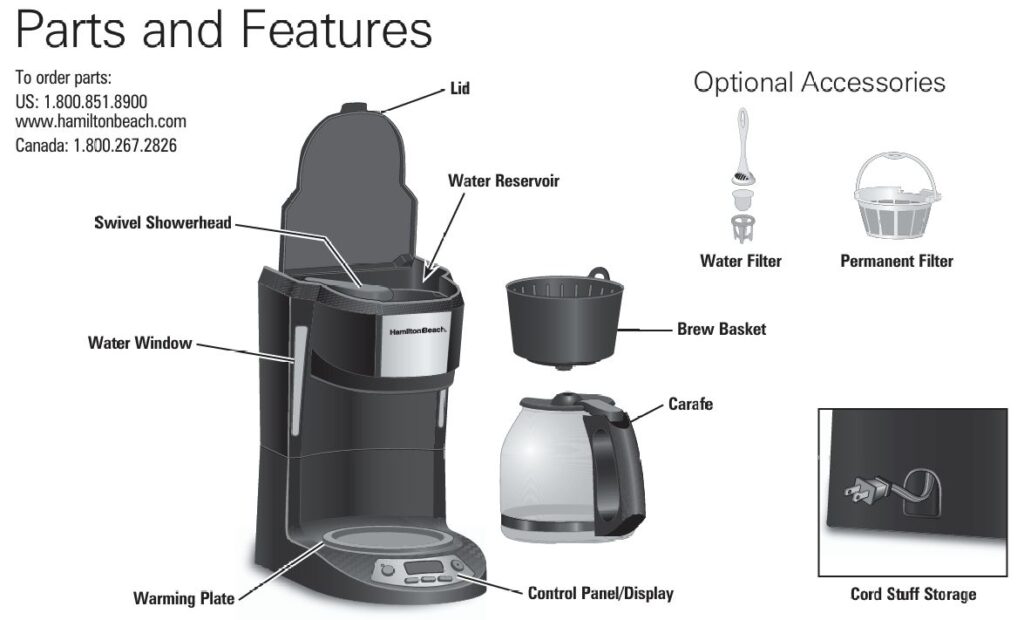
Knowing how your machine is designed helps you fix it smarter:
- 12-Cup Glass Carafe with lid – must be fully seated for proper flow.
- Swivel Showerhead – swings to access the brew basket and reservoir; must be correctly positioned over the basket to brew.
- Brew Basket – uses cupcake-style paper filters or a permanent filter.
- Brew Options Button – Regular, Bold, and 1–4 cup setting.
- Programmable Clock & PROG Button – for auto-start brewing.
- 2-Hour Auto Shutoff – machine turns off automatically.
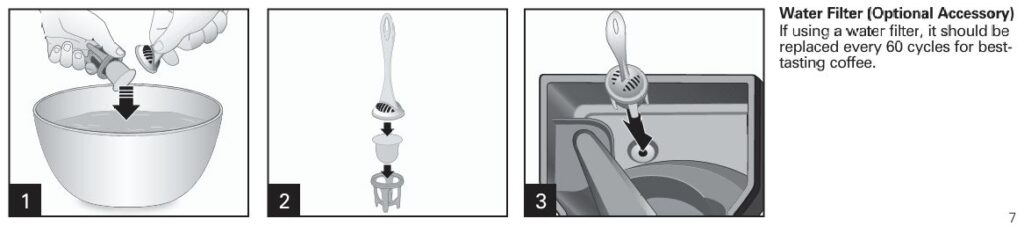
- Optional Water Filter – improves taste (if installed).
- Warming Plate – keeps coffee hot; hot even after power off.
Many “problems” come down to one of these being misaligned, dirty, or misunderstood.
Quick Diagnostic Table
Use this as your fast reference, then scroll down for detailed steps.
| Symptom | Likely Cause | Recommended Fix |
|---|---|---|
| No power / no brew | Not plugged in, outlet issue, auto-shutoff, clock reset | Check outlet, plug, reset clock, press ON/OFF properly |
| Coffee maker on, but no water flows | Empty reservoir, showerhead not positioned, basket misfit | Fill tank, align showerhead, check basket & carafe |
| Basket overflows / drips onto hot plate | Too much coffee, fine grind, wrong filter, clog, misaligned carafe | Adjust grounds, filter, clean basket, reseat carafe |
| Coffee brews very slowly | Mineral scale buildup, fine grind, too much coffee | Descale with vinegar, switch to medium grind |
| Coffee tastes bad / plastic / sour / bitter | Dirty machine, old coffee, poor water, scale | Deep clean, use fresh coffee & filtered water |
| Auto-brew doesn’t start | Time not set, PROG not engaged, power interruption | Reset clock, reprogram, confirm PROG icon |
| Warming plate cold | 2-hour auto shutoff, no brew completed, internal fault | Brew fresh pot, confirm power; if dead, service |
| Water on counter / underneath | Overfilling, pouring while brewing, crack, misalignment | Check fill level, use Pause & Serve correctly, inspect carafe |
| Grounds in coffee | Filter folded/collapsed, poor filter, too fine grounds | Reseat filter, replace with better filter, medium grind |
Problem 1: Coffee Maker Won’t Brew / Won’t Turn On
Step-by-Step Checklist
1. Confirm Power & Outlet
- Make sure the unit is firmly plugged into a working 120V outlet.
- Test the outlet with another appliance (like a lamp).
- Avoid using a high-load power strip with other heavy appliances on the same circuit.
If there’s been a power outage or surge, your clock will reset and auto-brew settings will be cleared. You must re-set the time.
2. Check the Basics
- Is there water in the reservoir?
- Is the carafe in place on the warming plate?
- Is the swivel showerhead positioned directly over the brew basket?
- Press the ON/OFF (I/◼) button firmly once. The light/display should indicate brewing has started.
3. If Nothing Responds
If:
- Outlet works
- Plug is fine
- No lights, no sound, no heating
Then this points to an internal electrical fault (board, fuse, switch). Do not open the bottom cover. Contact Hamilton Beach support or an authorized service provider.
Technician Tip: Total power loss with a good outlet is not a “home fix” scenario on this model.
Problem 2: Brew Basket Overflows or Coffee Drips Everywhere
This is one of the most common complaints with drip brewers.
Common Causes
- Too much coffee grounds.
- Using very fine or espresso grind, or certain decaf/flavored coffees.
- Filter not seated/opened properly.
- Basket clogged with old coffee residue.
- Carafe not fully under the basket.
- Machine needs cleaning (scale slowing flow).
Fix: Step-by-Step
Step 1 – Stop Safely
- Press ON/OFF to stop brewing.
- Unplug.
- Allow everything to cool before opening the basket.
- Clean up overflow to avoid burn or slip hazards.
Step 2 – Check Coffee Amount & Grind
- For this 12-cup machine, start with about:
- 1 level tablespoon per cup for regular strength.
- Slightly less for decaf or flavored coffee.
- Avoid extra-fine or espresso grinds; use a medium drip grind.
Step 3 – Filter Placement
Make sure:
- You’re using cupcake-style basket filters (not cone filters) or the correct permanent filter.
- The filter is fully opened and pressed gently against the basket walls.
- No grounds are trapped between filter & basket edge.
Poorly fitting or cheap filters collapse easily and cause overflow.
Step 4 – Carafe & Showerhead Alignment
- Carafe must sit flat on the warming plate.
- Lid fully attached.
- Swivel showerhead must be positioned over the brew basket—not over the reservoir.
If the carafe is off-center or removed for too long during Pause & Serve (>20 seconds), coffee backs up and can overflow.
Step 5 – Deep Clean to Restore Flow
If it still overflows or runs extremely slowly, go to the Cleaning & Descaling section below—scale buildup is a major cause.
Problem 3: Coffee Brewing Too Slowly
A slow brew usually means scale buildup or clogging.
What To Do
- Check water path visually: remove basket and showerhead; look for residue or trapped grounds.
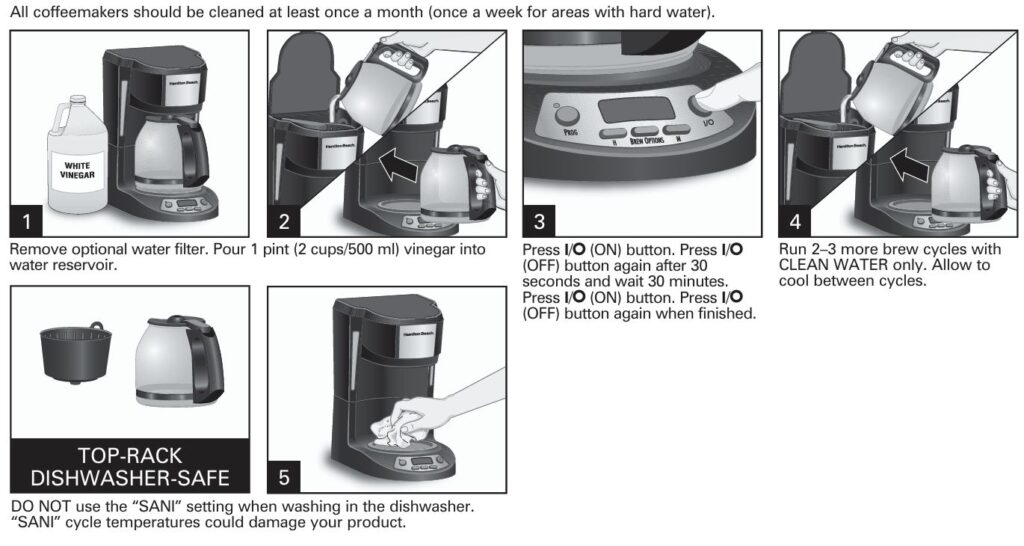
- Descale with white vinegar (manufacturer-approved method):
- Remove optional water filter (if installed).
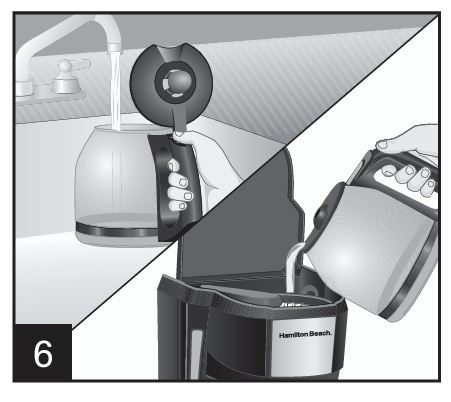
- Fill reservoir with ~2 cups (500 ml) of plain white vinegar.
- Start a brew cycle.
- After about 30 seconds, turn OFF.
- Let sit for 30 minutes (so vinegar can dissolve mineral deposits).
- Turn ON again and let the full cycle complete.
- Run 2–3 full cycles of clean water afterward to rinse.
- Switch to medium grind and correct coffee amount.
If after descaling it’s still unusually slow with normal conditions, it may indicate internal blockage: time to contact service.
Problem 4: Coffee Tastes Bad (Bitter, Weak, Metallic, Stale)
Cause Checklist
Bad taste is rarely a “broken machine” issue. It’s usually:
- Dirty machine (oils & residue).
- Hard-water scale.
- Poor-quality or old beans.
- Wrong coffee-to-water ratio.
- Using unfiltered tap water with strong odors.
Step-by-Step Taste Fix
- Clean removable parts daily:
- Carafe & lidBrew basketPermanent filter (if used)Swivel showerhead area (wipe carefully)
- Descale monthly (weekly in hard water areas) using the vinegar method above.
- Use better inputs:
- Fresh, sealed coffee.
- Medium grind.
- Filtered or bottled water.
- Standard ratio: about 1–2 Tbsp per 6 fl oz; adjust for taste.
- Avoid letting coffee sit for hours: The 2-hour auto-shutoff helps, but old coffee will still taste burnt or flat. Brew what you’ll drink.
Problem 5: Auto-Brew / Programming Not Working
If your 49615 doesn’t start at your programmed time:
Programming Checklist
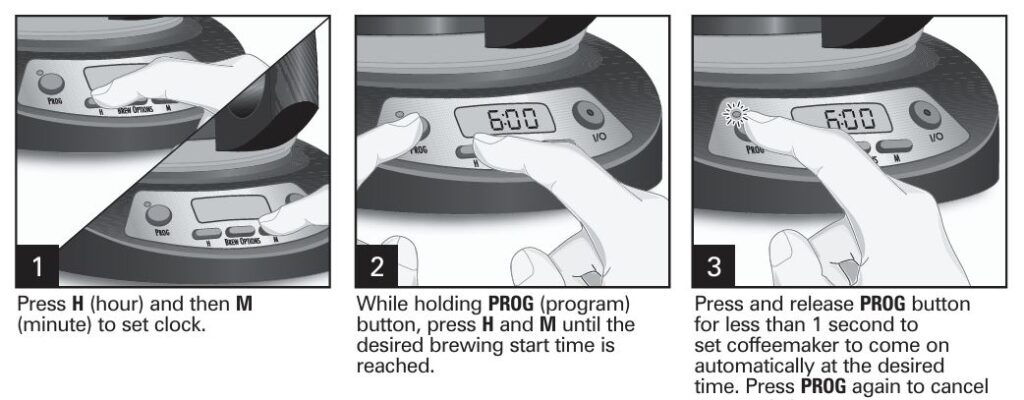
- Set the clock first
- Press H to set hour (ensure AM/PM is correct if applicable).
- Press M to set minutes.
- Set program time
- Hold PROG.
- While holding, use H and M to choose your desired brew start time.
- Release PROG.
- Activate auto-brew
- Press PROG briefly (less than 1 second).
- Confirm that the program/indicator icon shows (varies by panel style).
- Add water + coffee + correctly placed basket/carafe before the start time.
- After power loss Any outage or unplugging resets the clock; reprogram before relying on auto-brew.
If the time is correct, PROG is set, there’s water & coffee, but it still never starts—this may indicate a control board issue. At that point, contact service.
Problem 6: Warming Plate Not Heating
Normal Behavior
- Warming plate heats only after a brew cycle starts.
- It turns off automatically after about 2 hours.
Troubleshooting
- Brew a fresh pot and check if the plate warms within a few minutes.
- Ensure unit hasn’t auto-shutoff.
- Confirm outlet and ON/OFF function.
If the warming plate never heats despite correct brewing:
- This suggests an internal component failure (heater or control).
- Do not try to bypass or repair internally.
Problem 7: Leaks, Drips, or Water Under the Machine
Check for Simple Causes First
- Are you filling only up to the max line on the water window?
- Is the carafe correctly positioned under the brew basket?
- Did you remove the carafe for too long during brewing?
- Is the carafe cracked or chipped around the rim?
- Any coffee grounds stuck under the brew basket or around the valve?
Steps
- Clean the area under the brew basket.
- Ensure the basket is seated flat and the showerhead is above it.
- Check carafe rim & lid for damage; replace if cracked.
- Run a test brew with only water and watch carefully.
If water appears from the bottom (not the basket/carafe area) even in a plain-water test:
That indicates a possible internal hose, seal, or tank leak. For safety, stop using and contact Hamilton Beach support.
Problem 8: Grounds in the Coffee
To reduce gritty coffee:
- Use correct basket-style paper filters or a compatible permanent filter.
- Open and seat the filter fully; no folds collapsed.
- Avoid cheap/very thin filters.
- Do not overfill with grounds.
- Use a medium grind; extra-fine particles slip through.
If using a permanent filter:
- Rinse thoroughly after each use.
- Inspect for tears or mesh damage.
Problem 9: Pause & Serve Issues (Coffee Spills When You Pull the Carafe)
Your 49615 includes a Pause & Serve feature that stops flow briefly when you remove the carafe.
Key rules:
- Only remove the carafe mid-brew for a quick pour.
- Return it within 20 seconds to avoid overflow from the brew basket.
- Make sure the carafe lid is correctly installed so coffee flows properly when returned.
If it overflows when using Pause & Serve:
- You’re leaving it out too long, or the carafe isn’t fully reseated.
- Use a slightly lower coffee dose if the basket is filling too close to the top.
Problem 10: Carafe Problems (Cracks, Drips, Unsafe Use)
If you notice:
- Cracks, chips, or loose handle
- Leaks from the glass itself
- Severe scratching
Stop using immediately and replace the carafe. Never:
- Put the carafe on a stovetop or in a microwave.
- Put a hot carafe on a cold or wet surface.
- Use abrasive pads or metal spoons aggressively inside.
These points are critical both for safety and to prevent shattering.
Essential Cleaning & Maintenance Schedule
After Every Brew
- Discard used filter & grounds.
- Rinse brew basket, carafe, lid, and (if used) permanent filter.
- Wipe down warming plate once cool (soft cloth only).
Weekly (or More Often for Heavy Use)
- Wash removable parts with warm soapy water or top-rack dishwasher (no “SANI” cycle).
- Wipe exterior and showerhead area.
Monthly Descale (Weekly in Hard-Water Areas)
As covered earlier:
- Remove water filter.
- Add 2 cups (500 ml) white vinegar to reservoir.
- Start brew → stop after 30 seconds → wait 30 mins.
- Restart, let cycle complete.
- Brew 2–3 cycles with clean water only.
Regular maintenance prevents many of the “mystery” issues: slow brew, overflow, bad taste, and inconsistent performance.
Pro Tips for Best Results
- Use filtered water + fresh medium-grind coffee.
- Use the Bold setting for stronger extraction instead of overdosing grounds.
- For small batches (1–4 cups), use the 1–4 cup setting so the flow rate and temperature stay optimal.
- Store your coffee maker in a dry place; avoid cramped corners where steam can damage surrounding cabinets.
“Most chronic issues with this model vanish when it’s kept clean, correctly assembled, and used with proper grind and filter.”
FAQs: Hamilton Beach 49615 Troubleshooting
Why does my Hamilton Beach 49615 shut off by itself?
This model includes a 2-hour auto-shutoff for safety. If it turns off around that time, it’s normal. If it shuts off immediately or within minutes of starting, verify power stability. If consistent, contact service.
Can I use cone filters instead of basket-style filters?
It’s designed for cupcake-style basket filters. Cone filters can collapse, restrict flow, and cause overflow. Stick to the recommended style or use the correct permanent filter.
My coffee tastes like vinegar after cleaning. What did I do wrong?
You didn’t rinse enough. After a vinegar clean, always:
- Run 2–3 full cycles of clean water.
- Discard that water before brewing coffee.
Is it safe to repair the inside myself if it’s leaking or not heating?
No. The manufacturer explicitly states there are no user-serviceable parts inside. Opening the base risks electric shock, fire, and voids warranty. Use authorized service channels.
Why does my basket overflow only with decaf or flavored coffee?
Decaf and flavored coffees are often ground finer and swell more. Use:
- Slightly less coffee than regular.
- A medium grind.
- A quality basket filter.
This directly aligns with the manufacturer’s recommendations.
Can I leave water in the reservoir overnight for auto-brew?
Yes, as long as:
- The reservoir is clean.
- The coffee maker and area are dry.
- You set up filter + coffee correctly.
For best flavor, use fresh water daily.
The time/clock keeps resetting. Is my machine defective?
Not necessarily. Any unplugging or power loss will reset it. If it resets without power loss, that may indicate an internal board issue—then it’s worth calling support.
When to Stop Troubleshooting and Call for Service
Contact Hamilton Beach or a qualified service center if:
- No lights / no heat despite confirmed power.
- Burning smell, smoke, or unusual buzzing.
- Water leaking from the base even on water-only test.
- Warming plate never warms after successful brew.
- Visible damage to cord or plug.
- Repeated overflow despite correct setup, cleaning, and dosing.
Do not continue using a compromised unit.


0 Comments