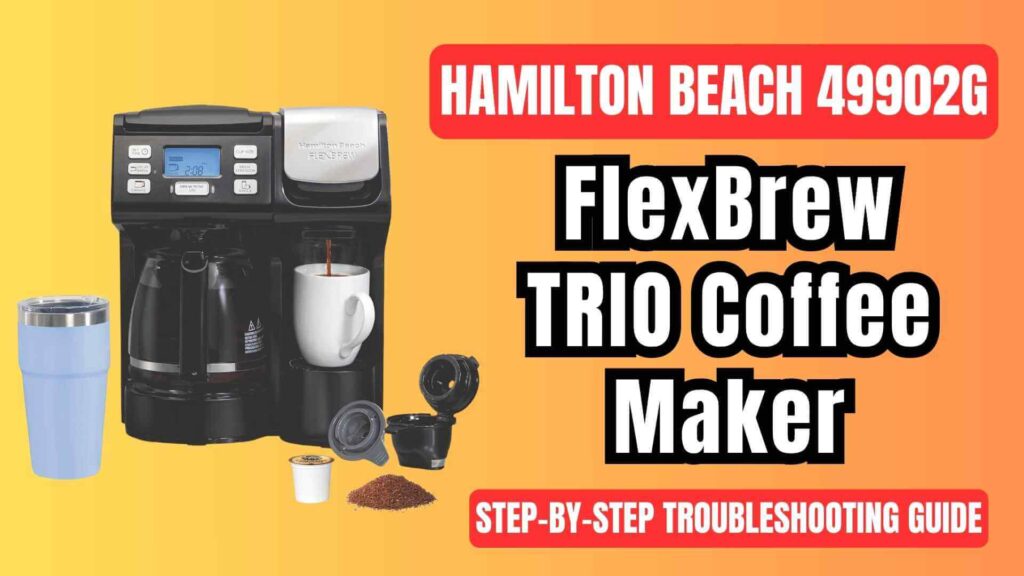
The Hamilton Beach 49902G FlexBrew® trio coffee maker is a popular, versatile brewing appliance that offers the convenience of single-serve pods, ground coffee, and a full 12-cup carafe. However, like any coffee maker, it can sometimes run into issues that prevent it from performing at its best. In this guide, we will walk you through some common problems with the Hamilton Beach 49902G FlexBrew® and provide step-by-step troubleshooting solutions validated by the user manual.
Whether you’re dealing with brewing issues, overflow, bad-tasting coffee, or other errors, this guide will help you get your coffee maker back in action.
Common Issues with the Hamilton Beach 49902G FlexBrew® Trio Coffee Maker & their Solutions
Coffee Maker Won’t Brew
If your coffee maker is not brewing, there could be several reasons why. Here’s a detailed look at what might be causing this problem:
Possible Causes with their Solutions:
- Lid Not Closed Properly
The Hamilton Beach 49902G FlexBrew® will not brew if the lid is not properly closed. The coffee maker is equipped with a sensor that detects whether the lid is securely locked. If the lid is even slightly ajar, the brewing cycle will not begin. Always check that the lid is fully closed and locked into place before starting the brewing process. - Insufficient Water in the Reservoir
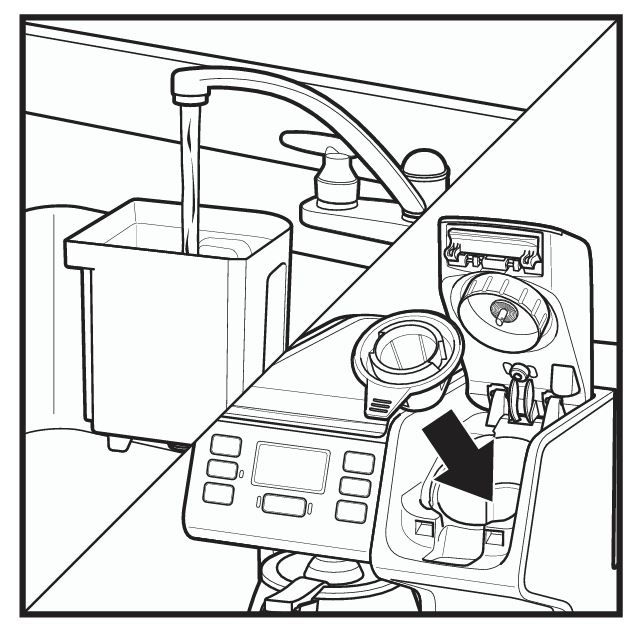
The coffee maker won’t brew if the water reservoir is below the minimum fill line (15 oz or 444 ml). Always ensure you have enough water in the reservoir for the desired brew size. If the reservoir is empty or too low, fill it to the appropriate level to allow the machine to brew.
- Clogged Needle
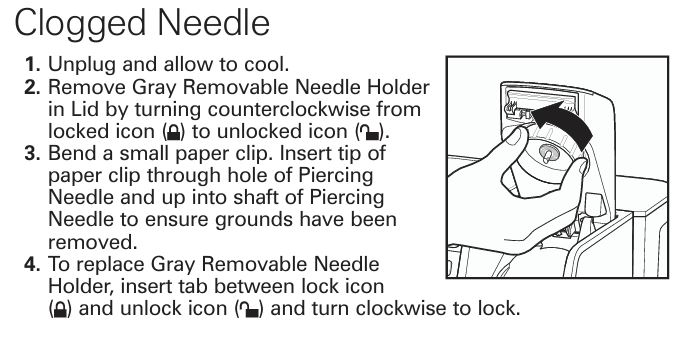
The piercing needle, which punctures the coffee pod or ground coffee filter, can become clogged over time due to coffee grounds, mineral deposits, or other debris. This clog can stop water from flowing properly into the coffee pod or filter, preventing the coffee maker from brewing. Regular cleaning of the piercing needle is crucial to avoid this issue. To clean the needle, remove the gray removable needle holder and use a small paper clip to clear the hole.
- Power Issues
If your coffee maker isn’t turning on, it might not be receiving power. Ensure that the coffee maker is plugged into a working outlet and that the power switch is in the “on” position. If there has been a power surge, unplug the coffee maker, wait for a minute, and then plug it back in to reset the system. - Faulty Control Panel
If the coffee maker’s control panel is unresponsive, check to see if there is a malfunction with the buttons or the display. In such cases, unplugging the unit for a minute may help reset the system and restore normal functionality.
Overflow Issues
Overflow issues are common with coffee makers and can be caused by several factors. Here’s how to address overflow problems with your Hamilton Beach 49902G FlexBrew®:
Possible Causes with their Solutions:
- Too Much Coffee Ground
Adding too much ground coffee to the filter can cause the basket to overflow. The manual recommends using a maximum of 3 tablespoons of ground coffee for a single-serve brew. For a carafe brew, you should use 1 tablespoon of ground coffee per cup, not exceeding the 12-cup limit of the carafe. Always measure the grounds carefully to avoid overflow. - Using Fine Coffee Grounds
If you are using coffee that is ground too finely, it can cause clogging of the filter basket, leading to an overflow. This is especially common with single-serve pods or espresso grinds. The coffee grounds need to be medium or coarser in size to prevent clogging. If you’re using a coffee pod, ensure it is compatible with the FlexBrew® to avoid breakage or leaks. - Overfilled Water Reservoir
Overfilling the water reservoir can lead to water spilling out of the coffee maker. Be sure to follow the water level markings on the reservoir. For single-serve brewing, do not exceed the 15 oz minimum, and for carafe brewing, do not overfill past the 56 oz maximum.
Coffee Tastes Bad
If your coffee tastes bad, it’s often due to poor-quality water, incorrect coffee-to-water ratios, or stale coffee beans. Here are the most common causes:
Possible Causes with their Solutions:
- Stale or Low-Quality Coffee Beans
Coffee that is not fresh can taste bland or bitter. If you’re grinding your own beans, make sure to use freshly ground coffee within a week of grinding. If you’re buying pre-ground coffee, check the expiration date on the package and choose the freshest option available. - Poor Water Quality
The water you use plays a huge role in the flavor of your coffee. Hard water or tap water with impurities can lead to poor extraction, which results in a subpar cup of coffee. The manual recommends using filtered or bottled water for optimal flavor. - Incorrect Coffee-to-Water Ratio
If you’re adding too much or too little coffee relative to the amount of water, the taste of your coffee will suffer. For a balanced cup of coffee, use about 1 tablespoon of ground coffee per 6 oz of water. Adjust this ratio based on your personal taste preferences, but avoid using too much coffee, which can lead to bitterness. - Dirty Coffee Maker
A buildup of coffee oils, mineral deposits, and coffee grounds inside the coffee maker can result in off-tasting coffee. Clean your machine regularly, especially if you use hard water, as it can leave mineral deposits in the brewing system.
Brew Cycle Problems
Sometimes, your FlexBrew may have issues with completing the brew cycle, causing it to brew either too slowly or not at all. Here’s how to troubleshoot:
Possible Causes with their Solutions:
- Brew Time Too Long
The “Bold” brew setting is designed to extract more flavor from the coffee grounds, and as a result, it takes longer to brew. If you’re using this setting, be patient as the coffee maker will brew more slowly to produce a richer cup of coffee. - Mineral Build-Up
If you live in an area with hard water, mineral deposits can accumulate inside the coffee maker and clog the brewing system. This can lead to a slower brewing process or incomplete brewing cycles. The manual recommends descaling the coffee maker every month to prevent mineral build-up. - Control Panel Error
If the coffee maker’s display or buttons are malfunctioning, it may affect the brewing cycle. Reset the coffee maker by unplugging it for a minute, and then plug it back in to clear any control panel errors.
Single Serve Problems
Single-serve brewing is convenient, but it can sometimes present specific issues, such as overflowing or weak coffee. Here’s how to troubleshoot single-serve brewing:
Possible Causes with their Solutions:
- Pod Not Pierced Properly
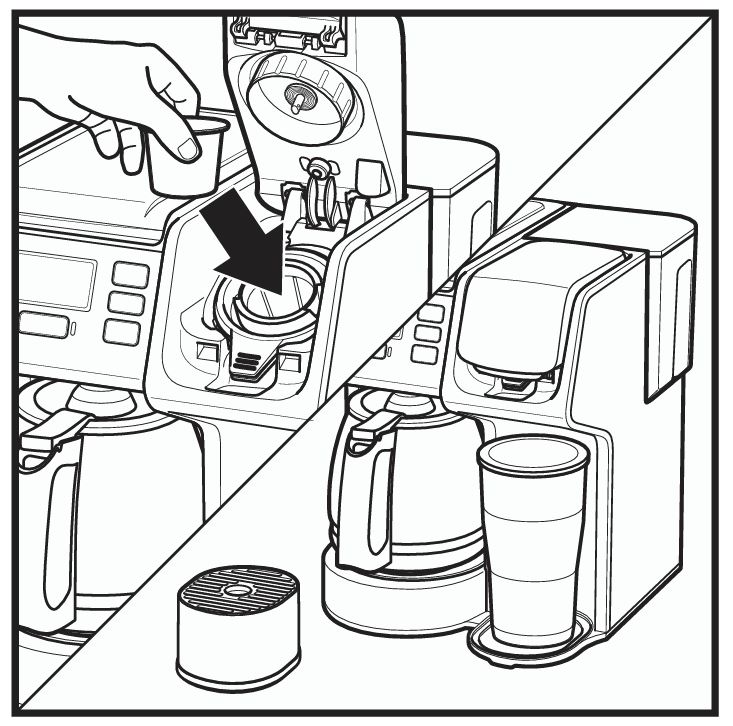
If the coffee pod is not pierced properly, water won’t flow through the pod, and the brewing cycle will fail. Always check that the pod is securely placed in the pod holder and that the lid is fully closed to pierce the pod. If you’re using ground coffee, ensure the filter is correctly placed and not overloaded.
- Pod Compatibility Issues
Some coffee pods may not be compatible with your FlexBrew model, causing problems like bursting or insufficient brewing. The manual suggests using only the recommended pods for best results. - Overflowing Coffee
Overflowing coffee during single-serve brewing is often caused by using an incorrectly sized cup or not properly inserting the cup into the holder. Ensure you’re using a cup or travel mug that fits properly under the coffee dispenser.
Water Leakage
Water leakage can be a frustrating issue, especially when you notice water pooling under the coffee maker. Here’s why it might be happening:
Possible Causes with their Solutions:
- Overfilled Water Reservoir
An overfilled water reservoir is the most common cause of water leakage. Do not exceed the recommended water levels in the reservoir. For single-serve brewing, the water should be above the 15 oz line, and for carafe brewing, use up to 56 oz. - Damaged Water Reservoir Seal
If the seal on the water reservoir is damaged or worn out, it may cause leaks. Check the seal and replace it if necessary.
Step-by-Step Solutions
How to Fix Brewing Problems
- Ensure Proper Water Levels
Check the water reservoir to make sure it’s filled to the appropriate level. If it’s too low, add water until it reaches the required minimum line. - Check the Lid
Make sure the lid is securely locked before starting the brewing process. If the lid is slightly open, the machine won’t brew. - Clean the Needle
Regularly clean the piercing needle to prevent clogs. Follow the manual’s instructions to remove the needle holder and use a paper clip to clear any debris. - Check Power Source
Verify that the coffee maker is properly plugged into a working outlet. If there is a power issue, reset the appliance by unplugging it and plugging it back in.
How to Prevent Overflow
- Use Correct Coffee Amounts
Use the correct amount of ground coffee for your brew. For a single-serve brew, do not exceed 3 tablespoons of ground coffee. For a carafe, use 1 tablespoon per cup of coffee. - Use Coarse Grounds for Single Serve
If you’re using ground coffee, ensure it’s coarser to prevent clogging. For single-serve pods, check the pod’s compatibility with the machine. - Check the Water Level
Never overfill the water reservoir. Stick to the recommended water levels and always measure before brewing. - Avoid Overloading the Pod Holder
Use only one pod per brewing cycle to avoid overflow or breakage.
How to Fix Bad Coffee Taste
- Use Fresh Coffee Beans
Use freshly ground coffee beans for the best flavor. Avoid using pre-ground coffee that is close to its expiration date. - Use Clean, Filtered Water
Tap water may contain minerals and impurities that affect the flavor of your coffee. Use filtered or bottled water for optimal results. - Adjust the Coffee-to-Water Ratio
Experiment with the amount of coffee grounds. A general rule of thumb is to use 1 tablespoon of coffee per 6 oz of water, but you can adjust this based on your taste preferences. - Clean Your Coffee Maker Regularly
Clean your coffee maker every month (more often if you have hard water) to prevent mineral build-up, which can impact coffee flavor.
Frequently Asked Questions
Why does my FlexBrew overflow?
Overflow can occur if too much coffee is used, if the grounds are too fine, or if the water reservoir is overfilled. Ensure you follow the coffee-to-water ratio, use the right grind size, and check the water level.
How can I prevent my coffee from tasting bad?
Use fresh coffee beans, filtered or bottled water, and the right coffee-to-water ratio. Regularly clean your coffee maker to avoid mineral build-up and old coffee residue.
What should I do if my FlexBrew won’t turn on?
Check the power source and plug. If the coffee maker still doesn’t turn on, unplug it for a minute to reset it, and then plug it back in.
How do I clean the FlexBrew’s needle?
Remove the gray removable needle holder, use a small paper clip to clear any debris from the needle, and reattach the holder once clean.
Conclusion
The Hamilton Beach 49902G FlexBrew® Trio Coffee Maker is a reliable and efficient appliance for brewing coffee. By following this detailed troubleshooting guide, you can fix most common issues like brewing problems, overflow, bad-tasting coffee, and water leakage.
Regular cleaning and maintenance, as outlined in the manual, will keep your coffee maker working properly for years to come. If you continue to experience issues, don’t hesitate to contact Hamilton Beach customer service for assistance.

0 Comments