The Hamilton Beach 40518R Coffee Urn is an invaluable appliance for anyone who needs to brew large quantities of coffee. Whether you’re hosting a large family event, a party, or managing an office coffee setup, this urn’s 45-cup capacity makes it perfect for the job. The dual-spout feature ensures smooth dispensing for multiple guests at once.
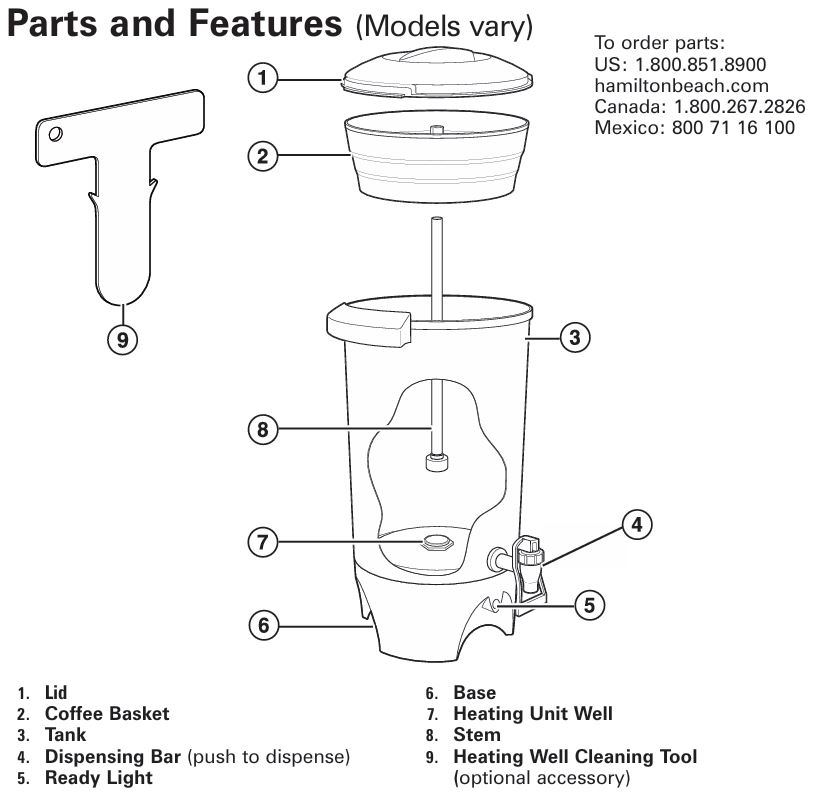
However, like any household appliance, the Hamilton Beach 40518R coffee urn is not immune to issues. Understanding how to troubleshoot and maintain it can ensure years of efficient use. This detailed guide offers step-by-step troubleshooting solutions for common problems, including coffee brewing issues, dispensing problems, and malfunctioning components, all based on the manufacturer’s recommendations in the user manual.
Common Issues with the Hamilton Beach 40518R Coffee Urn and Solutions

1. Coffee Not Brewing or Brewing Stops Mid-Cycle
It’s quite frustrating when your coffee urn doesn’t brew or stops brewing before completing the cycle. There are several common causes for this problem, but fortunately, they are often easy to fix. Here’s what you should check:
Possible Causes:
- Mineral Buildup in the Heating Unit: Over time, mineral deposits can accumulate in the heating unit, which can hinder the percolation process and cause the urn to stop brewing. The coffee may not reach the right temperature for brewing if mineral deposits are blocking the internal components.
- Solution: To clear mineral buildup, clean the urn with a solution of equal parts water and white vinegar. Follow the cleaning instructions outlined in the Care and Cleaning section of the manual. This process helps maintain the urn’s performance by preventing clogs in the system.
- Empty Water Tank: If the water tank is empty, the urn will not be able to brew coffee. Even if you’ve plugged the unit in, it needs sufficient water to function.
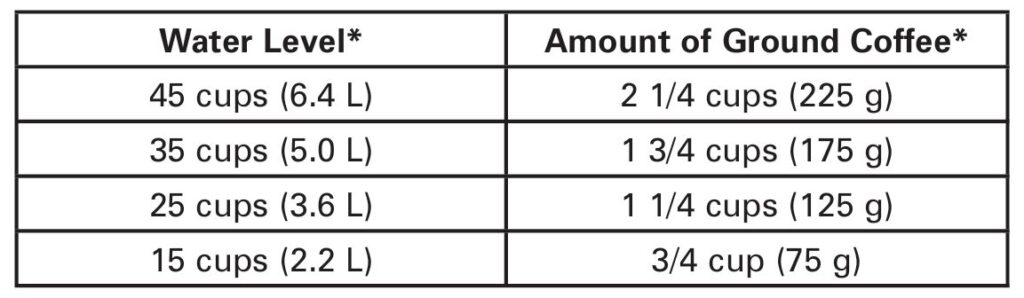
- Solution: Ensure that the water tank is filled above the minimum line. For a full brewing cycle, never exceed the 45-cup water level, as this could cause overflow and potential malfunction.
- Unplugged or Malfunctioning Power Source: A loose connection, malfunctioning outlet, or power outage can prevent the urn from turning on or completing its brewing cycle.
- Solution: First, check that the urn is properly plugged into a working outlet. Make sure the power cord isn’t damaged, and test the outlet by plugging in a different appliance. In the case of a power surge or outage, wait for the power to return and try again.
- Misaligned Stem in the Heating Unit Well: If the stem isn’t positioned correctly in the heating unit well, percolation won’t occur, and the coffee urn will fail to brew coffee.
- Solution: Turn off and unplug the urn. Remove the coffee basket and stem. Then, ensure that the stem is properly aligned and seated securely in the heating unit well before reassembling the urn.
2. Difficulty Dispensing Coffee
If you’re struggling to get coffee out of the urn, it’s likely due to issues with the dispensing system. Whether it’s a slow flow or no flow at all, here’s what to check:
Possible Causes:
- Clogged Coffee Dispensing System: The dispensing system can become clogged with coffee grounds or mineral deposits, especially if the urn isn’t cleaned regularly.
- Solution: Clean the entire urn thoroughly, focusing on the dispensing bar. You can use a water-vinegar solution to dissolve clogs and remove mineral buildup, as outlined in the How to Clean Mineral Deposits and Buildup section.
- Airlock in the Dispensing Valve: Sometimes, an airlock can form inside the dispensing valve, leading to weak or no flow of coffee. This often happens when the urn has been used frequently without proper maintenance.
- Solution: Ensure the dispensing valve is clear and free from any debris. You can also try tapping the urn gently to release any trapped air that may be causing the issue.
- Incorrect Position of Dispensing Bar: The dispensing bar should be properly positioned to ensure smooth and consistent flow of coffee. If it’s out of alignment, it can prevent the coffee from being dispensed correctly.
- Solution: Check that the dispensing bar is firmly in place and that nothing is obstructing its function. Ensure the valve mechanism is moving freely.
3. Coffee Tastes Off or Bitter
A bad taste in coffee could be due to several factors, including the coffee itself or improper maintenance of the urn. If you notice that your coffee is bitter or tastes off, consider the following:
Possible Causes:
- Leftover Coffee Grounds in the Basket: If you don’t remove the coffee basket and stem after the brewing cycle, the coffee grounds can continue to interact with the brewed coffee, making it taste bitter.
- Solution: Always remove the coffee basket and stem after brewing to prevent bitterness from developing. This is particularly important if you’re keeping the coffee warm for extended periods.
- Dirty Urn: If the urn hasn’t been cleaned regularly, old coffee oils and residues can accumulate, affecting the flavor of freshly brewed coffee.
- Solution: Clean the urn regularly according to the Care and Cleaning instructions. Pay special attention to the coffee basket, stem, and the heating unit well.
- Improper Coffee Grounds: Using fine coffee grounds, instead of coarser grounds, can cause the basket to overflow, leading to grounds getting into the brewed coffee, which can result in a gritty, bitter taste.
- Solution: Always use coffee that has been ground specifically for use in a percolator. If you are grinding your own beans, use a coarse grind.
Step-by-Step Troubleshooting for Common Problems
Problem 1: Coffee Urn Will Not Turn On
Step 1: Check the Power Supply
- Check the power cord and plug: Ensure the coffee urn is plugged into a working outlet and that the power cord isn’t damaged. If the power cord is defective, contact customer service for a replacement.
- Test the outlet: Plug another appliance into the same outlet to ensure it’s functioning properly. If the other appliance doesn’t work either, you may need to reset the circuit breaker or contact an electrician.
Step 2: Inspect the Heating Unit
- The heating unit is essential for percolating the coffee. If the stem is misaligned or seated improperly, it can prevent the unit from turning on or brewing coffee.
- Solution: Remove the coffee basket and stem. Verify that the stem is properly aligned in the heating unit well. This is a simple fix but crucial for the brewing process.
Step 3: Clean the Unit
- Mineral buildup and debris can prevent the urn from working. If the unit hasn’t been cleaned for some time, it may be clogged.
- Solution: Run a cleaning cycle with a water-vinegar mixture to dissolve mineral deposits. Make sure to follow the How to Clean Mineral Deposits section for best results.
Problem 2: Coffee Dispenser Not Working
Step 1: Clean the Dispensing Bar
- Mineral buildup or coffee grounds may clog the dispensing valve. Cleaning with a vinegar-water solution should clear the blockage.
- Solution: Fill the urn with the cleaning solution, run a brewing cycle, and then drain the solution through the dispensing bar. Rinse the urn thoroughly afterward.
Step 2: Check for Airlocks
- Airlocks can form in the dispensing system, affecting coffee flow. To resolve this:
- Solution: Gently tap the urn to release any trapped air, then try dispensing coffee again.
Step 3: Inspect the Dispensing Valve
- Make sure the dispensing valve is clear and that no coffee grounds are obstructing it.
- Solution: Remove the dispensing bar and clean it thoroughly. Ensure the valve mechanism is functioning smoothly.
Routine Maintenance for Long-Lasting Performance
How to Prevent Common Issues:
To avoid future problems and extend the life of your Hamilton Beach 40518R Coffee Urn, regular maintenance is key:
- Clean the Urn Regularly: Periodically clean the urn to prevent mineral buildup. This can be done with a mixture of equal parts water and vinegar. Run the cleaning cycle as described in the manual every 15-20 cycles, or more often if you use hard water.
- Use Coarse Coffee Grounds: To prevent overflow and clogs in the coffee basket, always use a coarse grind of coffee beans. Fine coffee grounds can cause coffee to overflow into the urn, leading to bitterness and potential clogging.
Frequently Asked Questions (FAQs)
Why does my coffee urn stop brewing in the middle of the cycle?
The most common causes include an empty water tank, a misaligned stem, or mineral buildup in the heating unit. Make sure the urn is filled with water, and the stem is properly aligned in the heating unit well. Regular cleaning will also prevent mineral buildup.
Can I use fine coffee grounds in the Hamilton Beach Coffee Urn?
It’s best to use coarse coffee grounds to prevent overflow and clogs. Fine coffee grounds can lead to an unpleasant, gritty texture in the coffee and potentially cause the basket to overflow.
How often should I clean my coffee urn?
It is recommended to clean the urn every 15-20 cycles, or more frequently if you use hard water. This helps to prevent mineral buildup and ensures optimal brewing performance.
How long will it take to brew 45 cups of coffee?
The brewing time is approximately one minute per cup. Therefore, brewing 45 cups will take around 45 minutes. Keep in mind that this can vary depending on the water temperature and other factors.
The Hamilton Beach 40518R Dual-Spout Coffee Urn is a reliable appliance that can serve large groups with ease. By following the troubleshooting steps outlined in this guide and regularly maintaining the urn, you can ensure that it continues to brew high-quality coffee for years to come. If issues persist, refer to the manufacturer’s warranty or contact Hamilton Beach’s customer service for further assistance.


0 Comments