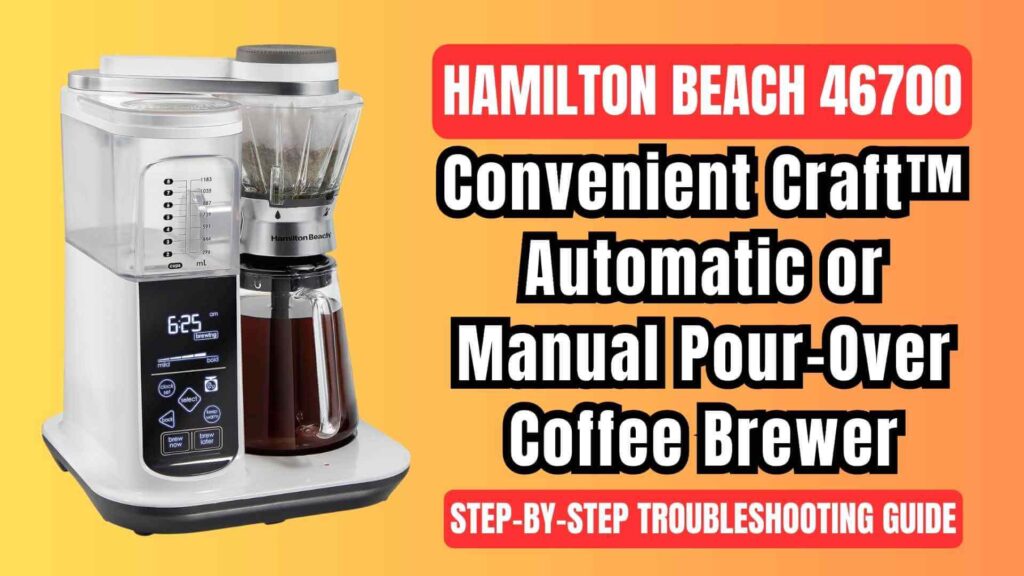
The Hamilton Beach 46700 8-cup Convenient Craft™ pour-over coffee brewer offers a fantastic way to make flavorful, full-bodied coffee with a manual touch, but like any electronic appliance, issues may occasionally arise. Whether your coffee is tasting off, the display shows an error message, or the brew cycle is taking longer than expected, we’ve got you covered with a comprehensive troubleshooting guide.
This guide will not only help you fix common problems but also improve your brewing experience using tips validated from the official user manual.
Hamilton Beach 46700 Coffee Maker: Common Problems and Their Solutions
1. Longer Than Normal Brew Time
A longer brew time than usual can be caused by several factors, all of which are easily addressable. If you notice that your brew cycle is taking longer than expected, try the following:
- Too Much Water Added
The Hamilton Beach 46700 has a maximum water capacity of 8 cups (1.2L). Overfilling the water reservoir will extend the brewing time, as the coffee maker will attempt to brew more than its designed capacity. Always ensure that you’re within the correct limits for water. - Coffee Maker Needs Cleaning
If the coffee maker has not been cleaned for an extended period, mineral deposits and other buildup can slow down the brewing process. The build-up of hard water minerals, coffee oils, and other residues can clog the system, affecting water flow. Regular cleaning of the coffee maker, especially in regions with hard water, is essential. It is recommended to clean the machine at least once a month, or more frequently if your water supply is hard. Cleaning involves descaling the internal components, which is outlined in the user manual. - Overflow Protection Activated
If too much coffee is added and the filter basket is nearing overflow, the scale inside the coffee maker detects this. As a safety measure, the heater turns off, allowing the brewed coffee to drain. Once the coffee drains to an appropriate level, the heater resumes, but this delay can add extra time to the brewing process. If the brew time seems excessively long, try reducing the coffee or water used in the cycle.
2. Coffee Tastes Bad
Several factors can impact the quality of your coffee. If your coffee doesn’t taste as good as it should, here’s what you can do:
- Water-to-Coffee Ratio
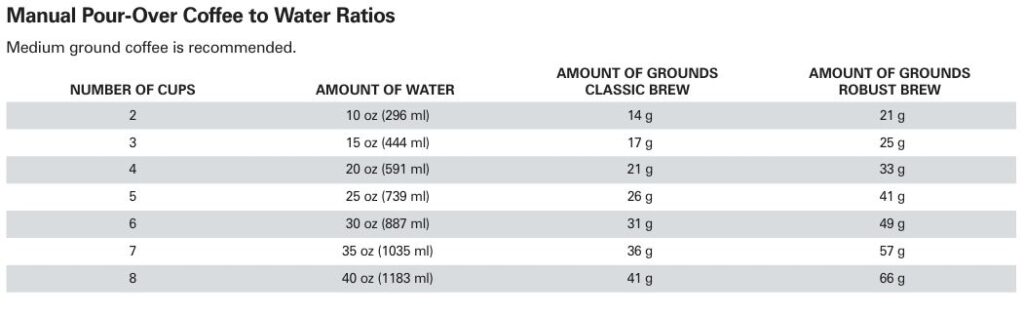
The correct amount of coffee and water is crucial for great-tasting coffee. If you’ve added too much water or too little coffee, or vice versa, the taste may be compromised. Use the recommended ratio of water to coffee grounds as specified in the manual. For classic brew strength, for example, 2 cups of water requires 14 grams of coffee, while for a robust brew, 21 grams of coffee is ideal (for 2 cups). - Old or Poor Quality Coffee
Coffee quality matters significantly. Old coffee beans or improperly stored coffee can produce bitter or flat flavors. Always use fresh, high-quality coffee beans, and store them in an airtight container to preserve their freshness. If you’ve been using coffee that’s past its prime, it might be time to switch to a fresher batch. - Water Quality
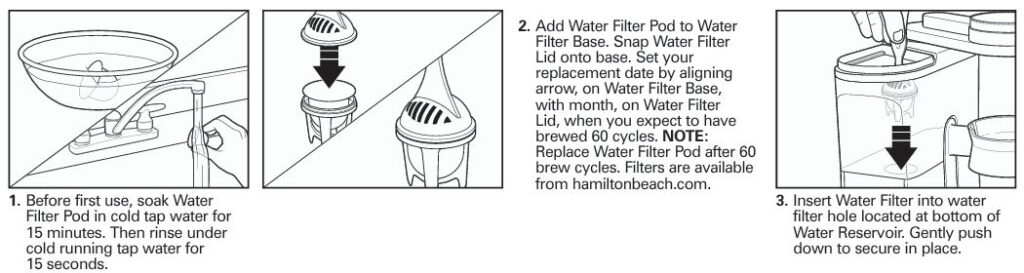
The quality of the water used in brewing can greatly affect the taste of your coffee. Hard water, or water with high levels of minerals, can result in an off taste. It’s best to use filtered or bottled water to ensure your coffee tastes as good as it can. If you’re using tap water, consider adding a water filter to your unit for better flavor.
3. Display Says “Add Water”
If the display shows that more water is required, don’t panic—this is a common issue. Follow these steps to resolve it:
- Ensure Correct Water Amount
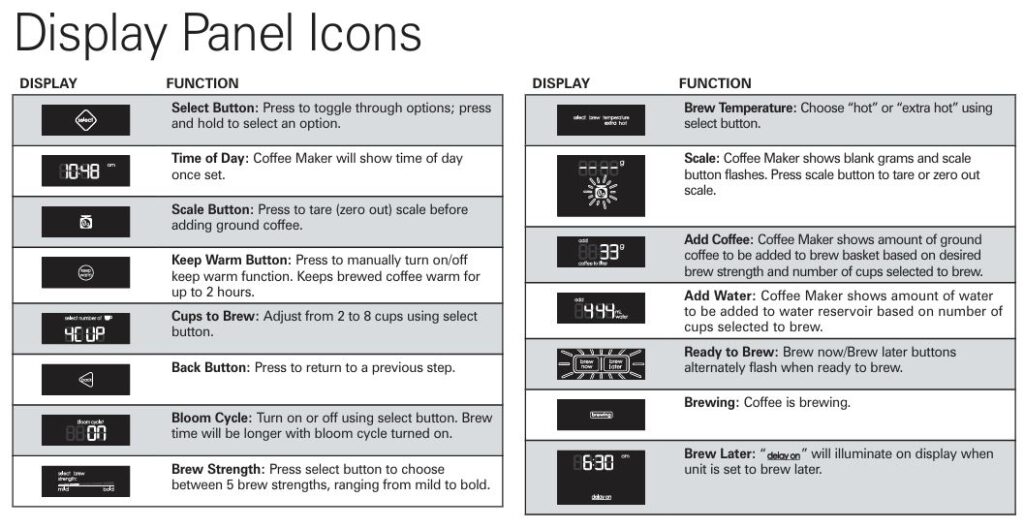
The coffee maker’s display will show the exact amount of water required based on the number of cups you’ve selected. Use the markings on the water reservoir to manually fill it with the correct amount of water. Ensure that you don’t overfill, as the unit doesn’t measure the water for you. - Check Water Reservoir Lid
The water reservoir lid must be correctly aligned and securely closed. If the lid isn’t properly in place, the coffee maker may not properly register the amount of water inside. Ensure the lid is on tight and check for any blockages or misalignments.
4. Coffee Weight Not Displaying Correctly
The coffee scale feature on the Hamilton Beach 46700 ensures that the right amount of ground coffee is used for each brew. However, issues can occur where the weight isn’t displayed correctly. To troubleshoot:
- Reset the Scale
First, remove any coffee grounds, including any paper filter if you’re using one. Then, press the scale button on the display panel. The display should show “dashes,” signaling that the scale is reset. Now, place an empty paper filter in the brew basket, press the scale button again, and the unit should show zero grams. Once this is done, you can start adding ground coffee until the display shows the correct amount. - Adjust the Grounds
If the display shows a negative number, it means you’ve added too much coffee. You can either remove some coffee grounds or leave the excess in the brew basket, as the exact measurement is not critical for the brewing process.
5. Error Codes
The Hamilton Beach 46700 may display error codes if something goes wrong. Here are the common error codes and how to handle them:
- E01, E02, E03
These errors typically indicate a malfunction or internal issue with the coffee maker. In this case, contact Hamilton Beach’s customer service for assistance. - E04
This error indicates that the coffee maker has overheated. To resolve this, unplug the unit and allow it to cool down completely before trying to use it again. - E08
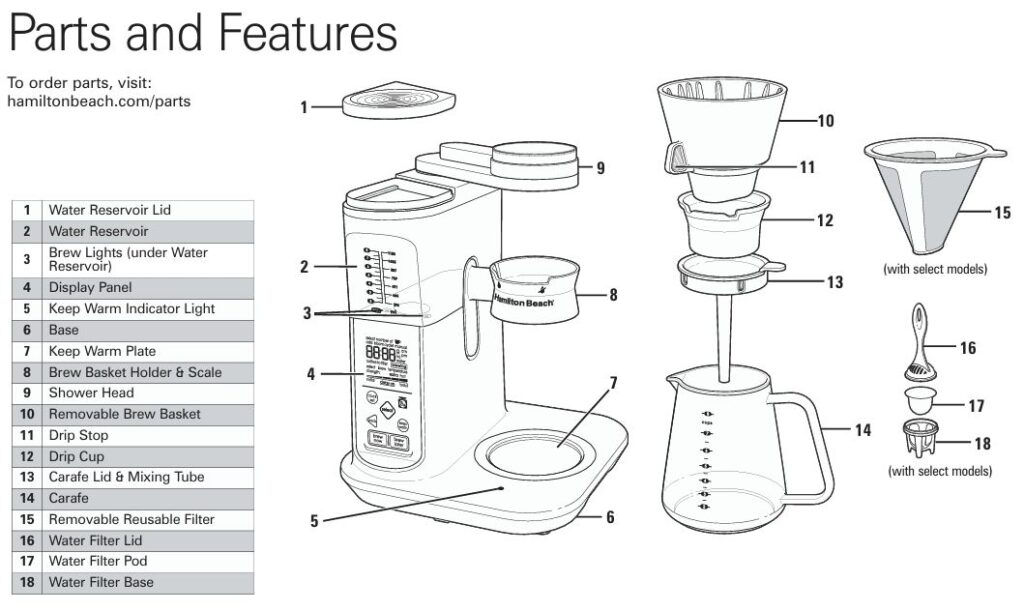
Ensure the shower head is properly positioned directly above the brew basket. If it’s misaligned, the coffee may not brew properly. - CLEn
The “CLEn” code indicates that the coffee maker requires cleaning. This may be due to mineral build-up or general maintenance needs. Follow the cleaning instructions provided in the user manual to resolve this.
Advanced Troubleshooting Tips
6. Manual Pour-Over Brewing Issues
Manual pour-over brewing offers more control over the strength and flavor of your coffee, but it requires careful attention. Here are some tips to troubleshoot common issues:
- Shower Head Alignment
The shower head is designed to evenly distribute hot water over the coffee grounds for a balanced, flavorful brew. If the shower head is not positioned correctly above the grounds, the coffee won’t brew properly. Always adjust the shower head manually before brewing. - Drip Stop Issues
The drip stop controls the flow of water into the brew basket. If the drip stop is not in the open position, the coffee will overflow or brew unevenly. Make sure the drip stop is in the open position before you start the brewing process. - Incorrect Blooming
Blooming refers to the process of pre-wetting the coffee grounds with a small amount of hot water to allow the coffee to “bloom.” This step releases carbon dioxide, improving the extraction process. If blooming is turned off or improperly executed, the coffee may taste sour or flat. You can adjust this setting on the display panel, which allows you to turn it on or off.
7. Brew Later Function Not Working
If the “Brew Later” function is not working correctly, there may be a setting or configuration error. Here’s what to check:
- Verify Settings
Ensure that all the necessary steps for setting up the Brew Later function are completed. This includes adding the ground coffee, positioning the shower head, and adding water. If any of these steps are skipped, the Brew Later function may not work correctly. - Power Interruption
If the power has been interrupted (e.g., the unit was unplugged), the Brew Later settings may be lost. In this case, reset the time and follow the Brew Later steps again to program it correctly.
Here’s a quick reference troubleshooting table for common problems with the Hamilton Beach 46700 8-Cup Pour-Over Coffee Brewer:
| Problem | Possible Cause | Solution |
|---|---|---|
| Longer than normal brew time | Too much water added | Ensure water does not exceed the 8-cup capacity (1.2L). |
| Coffee maker needs cleaning | Clean the coffee maker to remove mineral buildup. | |
| Overflow protection activated | Reduce coffee or water amount to prevent overflow. | |
| Coffee tastes bad | Incorrect water-to-coffee ratio | Use the correct amount of water and coffee grounds (refer to manual). |
| Poor-quality or stale coffee | Use fresh, high-quality coffee beans. | |
| Poor water quality | Use filtered or bottled water for better taste. | |
| Display says “Add Water” | Incorrect water amount | Add the exact amount of water shown on the display. |
| Water reservoir lid not properly secured | Ensure the water reservoir lid is tightly closed. | |
| Coffee weight not displaying correctly | Scale not reset properly | Reset the scale by pressing the scale button and zeroing it out. |
| Excess coffee added | Remove excess coffee to avoid a negative reading. | |
| Error Codes (E01, E02, E03) | Internal malfunction | Contact customer support for assistance. |
| Error Code E04 | Coffee maker overheating | Unplug and let the unit cool before using again. |
| Error Code E08 | Shower head misaligned | Ensure the shower head is positioned directly above the brew basket. |
| “CLEn” error | Coffee maker needs cleaning | Follow cleaning instructions in the manual. |
FAQs
How do I reset the coffee maker after an error?
Unplug the machine, wait for a few minutes for it to cool, and then plug it back in. Reset the settings as necessary.
Why is my coffee overflowing?
This usually happens when too much coffee or water is added, or when the filter basket isn’t in the right position. Ensure the correct amount of coffee and water is used and that the basket is correctly placed.
Can I use a regular paper filter instead of the reusable one?
Yes, you can use a #4 cone paper filter. If you’re using the reusable filter, you don’t need a paper one.
My coffee maker is not brewing at all. What should I do?
Ensure that the coffee maker is plugged in, the water reservoir is filled, and you’ve pressed the “Brew Now” button. If it still doesn’t work, try resetting the unit or contact customer support for assistance.
Conclusion
The Hamilton Beach 46700 Pour-Over Coffee Brewer is an excellent choice for coffee enthusiasts who want the convenience of automatic brewing with the flexibility of manual pour-over. While it’s generally a reliable and user-friendly appliance, occasional issues may arise.
By following this detailed troubleshooting guide, you can identify the causes of common problems and fix them quickly, ensuring that you get the best possible coffee from your brewer every time. Whether you prefer automatic brewing or the hands-on experience of manual pour-over, this guide will help you keep your coffee maker in top shape for a consistently great brew.

0 Comments