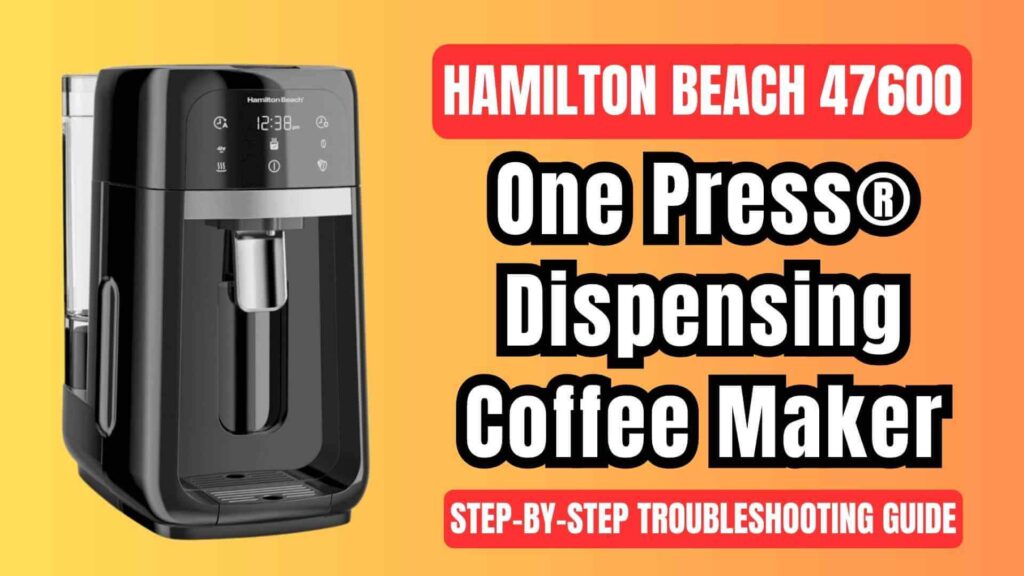
The Hamilton Beach 47600 One Press® Dispensing Coffee Maker is a popular choice for coffee lovers due to its easy-to-use dispensing system and durable design. However, as with any appliance, issues can arise from time to time. Whether it’s a malfunction, a brewing issue, or an error code appearing on the display, understanding the underlying causes and solutions will help you get your coffee maker working like new again.
Hamilton Beach 47600 One Press® Dispensing Coffee Brewer: Common Issues and Their Solutions
Below are some of the most common issues you may encounter with your Hamilton Beach 47600 Coffee Maker. Each problem is paired with a detailed solution to help you resolve it quickly.
Coffee Overflowing
Overflow is a frequent problem with many coffee makers, including the Hamilton Beach 47600. Overflow typically happens when there is an issue with the amount of coffee being brewed or the grind size.
Causes and Solutions:
- Too Much Coffee:
The first thing to check is how much coffee you’re using. For optimal brewing, the manual recommends 1 tablespoon (5 g) of ground coffee per cup of water. Exceeding this amount could cause overflow.
Tip: If using decaffeinated or finely ground coffee, try using slightly less coffee or opt for a coarser grind. Fine coffee grounds can cause slow filtration, which increases the chance of overflow. A coarser grind will speed up the filtration process, reducing the risk of overflow.
- Using the Wrong Filter:
The Removable Grounds Filter Basket can sometimes overflow if it’s overfilled. Ensure that you’re using the correct size and type of filter. If you find that the coffee is overflowing from the paper filter, try switching to a higher-quality filter. Paper filters that aren’t durable enough can allow grounds to escape, causing overflow. - Too Fine Coffee Grounds:
If you are using finely ground coffee, it’s essential to reduce the amount or opt for a bold brew strength. The bold brew strength allows the coffee maker to brew at a slower rate, which is particularly helpful for decaffeinated or finely ground coffee. Using this setting will help you avoid clogging the filter and prevent overflow. - Solution for Overflow During Brewing:
If overflow occurs during brewing, allow the coffee maker to cool down before removing the filter basket. Once it’s cooled, rinse the basket and coffee reservoir to clear out any grounds. Dry and reassemble the parts for the next use.
Poor Dispensing
Poor dispensing can happen when the coffee maker fails to dispense coffee efficiently or makes strange gurgling noises. These issues are usually related to improper assembly or obstructions in the system.
Causes and Solutions:
- Improper Assembly:
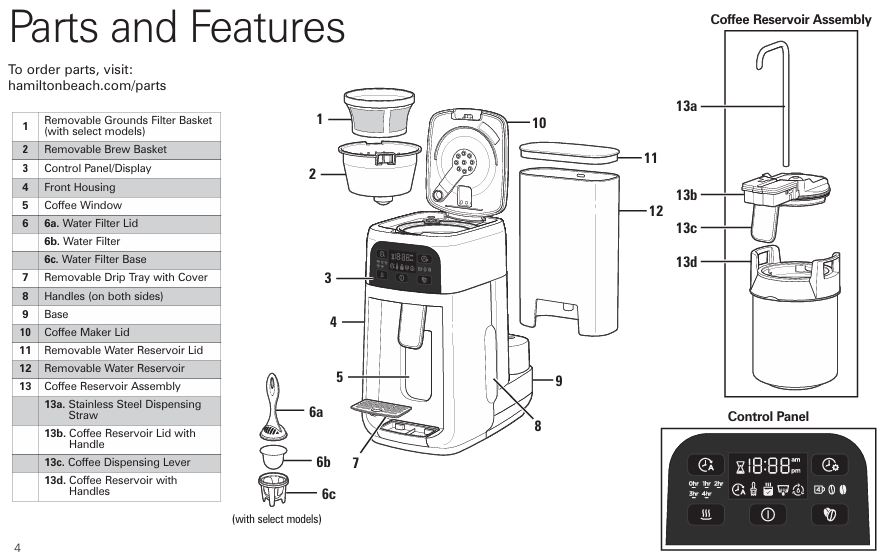
Ensure that the Coffee Reservoir Lid is properly secured. If the lid isn’t aligned or fully closed, the coffee will not be dispensed correctly.- Tip: Double-check that the Stainless Steel Dispensing Straw is correctly positioned and there are no obstructions in the dispensing system.
- Obstructions in the Dispensing Straw:
If the dispensing is slow or making unusual sounds, the Stainless Steel Dispensing Straw may be clogged. Remove the straw, wash it with warm, soapy water, rinse thoroughly, and reinstall.- Tip: Always make sure that the dispensing straw is free of any blockages to ensure smooth dispensing.
- Cold Temperature of Seals:
The seals on the Coffee Reservoir and lid should be at room temperature or warmer for a proper seal. If the coffee reservoir has been refrigerated or left in a cold environment, the seals may become stiff and prevent proper sealing.- Solution: Let the coffee reservoir warm up to room temperature before attempting to brew.
- Gurgling Noises:
Occasionally, when the coffee level is low in the Coffee Reservoir, gurgling noises may occur. This is normal, but it could also indicate a problem with the dispensing straw or the brewing system. If the noise persists or worsens, check for any obstructions in the dispensing path.
Error Codes Appearing on the Display
Your coffee maker may display certain error codes that need to be addressed in order to restore its function. Below are some common error codes and their meanings.
- FIL H2O Error:
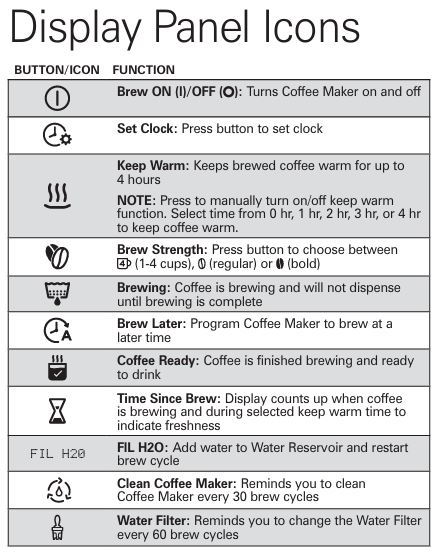
This error indicates that the water reservoir is empty or insufficiently filled. To fix this, add cold water to the Water Reservoir and restart the brewing cycle. Always fill the reservoir to at least the minimum 2-cup line, but not exceeding the maximum 14-cup line.- Tip: Ensure that the water reservoir is properly seated in the coffee maker to avoid this error.
- Clean Coffee Maker Error:
After 30 brewing cycles, the coffee maker will remind you to clean it. This is crucial to ensure the longevity of your coffee maker and the quality of your coffee. To clean, follow the steps outlined in the manual, using vinegar to descale the system.- Tip: Run 2-3 full cycles with clean water after the vinegar cycle to fully remove any vinegar residue from the system.
- Water Filter Error (filter icon):
When the water filter has reached the end of its useful life (after about 60 brew cycles), the coffee maker will display a water filter error. Replace the filter according to the Care and Cleaning instructions to resolve this issue.
How to Fix Overflow Problems
Overflow problems occur when the coffee grounds or water exceed the capacity of the filter basket, causing coffee to spill over the sides. Here are some additional tips to prevent this:
- Use the Correct Coffee Amount:
Always use 1 tablespoon (5 g) of coffee per cup of water. If using stronger blends or decaffeinated coffee, consider reducing the amount to prevent overflow. - Grind Size:
As mentioned earlier, grind size plays a significant role in preventing overflow. Finely ground coffee will filter more slowly, which could lead to overflow. Choose a medium grind for optimal brewing speed and efficiency. - Check the Filter Basket and Lid:
Ensure the Removable Grounds Filter Basket is not overloaded, and that the coffee reservoir lid is properly sealed during the brewing process. If either of these parts is misaligned, it could lead to spilling. - Use Bold Brew for Slow Brewing:
If you’re using decaffeinated or finely ground coffee, use the bold brew strength setting to allow the coffee to brew more slowly. This will help prevent overflow by allowing the water to pass through the coffee grounds at a more controlled pace.
Troubleshooting Poor Dispensing
If the coffee maker is not dispensing coffee, it could be due to a variety of factors. Below are additional troubleshooting tips:
- Ensure Proper Assembly:
Check the Coffee Reservoir Lid to make sure it is properly positioned. The lid should click into place, creating a tight seal. If the lid is not fully locked, the coffee will not dispense as expected. - Check for Obstructions in the Dispensing Path:
Remove the Stainless Steel Dispensing Straw and clean it with warm, soapy water. It’s also a good idea to clean the dispensing lever to ensure there are no blockages. - Maintain Temperature of Seals:
The seals on the Coffee Reservoir Lid should be kept at room temperature to prevent stiffness. Cold seals may cause poor dispensing or leaks.
Dealing with Error Codes
Addressing error codes promptly will help ensure the continued performance of your Hamilton Beach coffee maker. Here’s how to resolve common errors:
- FIL H2O Error:
This error appears when the Water Reservoir is empty. To resolve, simply fill the reservoir to the appropriate level. Remember not to overfill past the maximum 14-cup line. - Clean Coffee Maker Error:
Your coffee maker will prompt you to clean it after every 30 brew cycles. Follow the Cleaning Instructions to descale the coffee maker using white vinegar. This helps remove mineral buildup that can clog the system. - Water Filter Error:
Replace the water filter every 60 brew cycles for optimal performance. If you have hard water or use the coffee maker frequently, consider replacing the filter more often.
FAQs
How do I program the coffee maker to brew later?
To set the brew time, press the Brew Later button, select the time you want the coffee maker to start brewing, and then the coffee maker will begin brewing at the programmed time.
Why is my coffee maker not dispensing coffee?
This could be due to improper assembly, such as the Coffee Reservoir Lid not being sealed correctly. Double-check the assembly and ensure all parts are properly positioned.
Can I use tap water in my coffee maker?
For the best-tasting coffee, it’s recommended to use filtered or bottled water instead of tap water. Tap water can contain minerals that affect the taste and cause mineral buildup in the coffee maker.
Conclusion
The Hamilton Beach 47600 12-Cup One Press® dispensing coffee brewing machine is designed to deliver a high-quality coffee experience with its convenient one-press dispensing system. By following this detailed troubleshooting guide and performing regular maintenance, you can ensure that your coffee maker continues to perform optimally.
Whether you’re dealing with overflow issues, poor dispensing, or error codes, the solutions outlined here will help you get back to brewing your favorite cup of coffee in no time.

0 Comments