Coffee lovers depend on their machines — when Hamilton Beach FlexBrew gives an “overload error,” it interrupts your morning ritual and leaves you frustrated. Whether you use the single‑serve pod option or the full pot function, this error can appear unexpectedly. In this article, we walk you through what an “overload error” means, why it happens, and how you can troubleshoot and fix it. Knowing how to correct this issue can save you from costly replacements and restore your coffee maker’s reliability — essential for anyone who relies on their FlexBrew every day.
If you just want the quick answer: An overload error generally means the machine is detecting a blockage or excessive pressure or load on the motor or water‐flow path. The most common cause is a clogged piercing needle or water/coffee flow path; cleaning or resetting the machine usually fixes it.
What Does “Overload Error” Mean — Brief Explanation
When your FlexBrew shows an “overload” or “dual overload” error, it’s telling you that there is too much resistance in the water or coffee flow — either due to a blockage (from coffee grounds, mineral deposits, or airlock) or a misalignment or mechanical issue. This makes the motor or pump work harder than intended. Unplugging the machine, unplugging/re‐seating parts, and cleaning obstructions often resolves the problem.
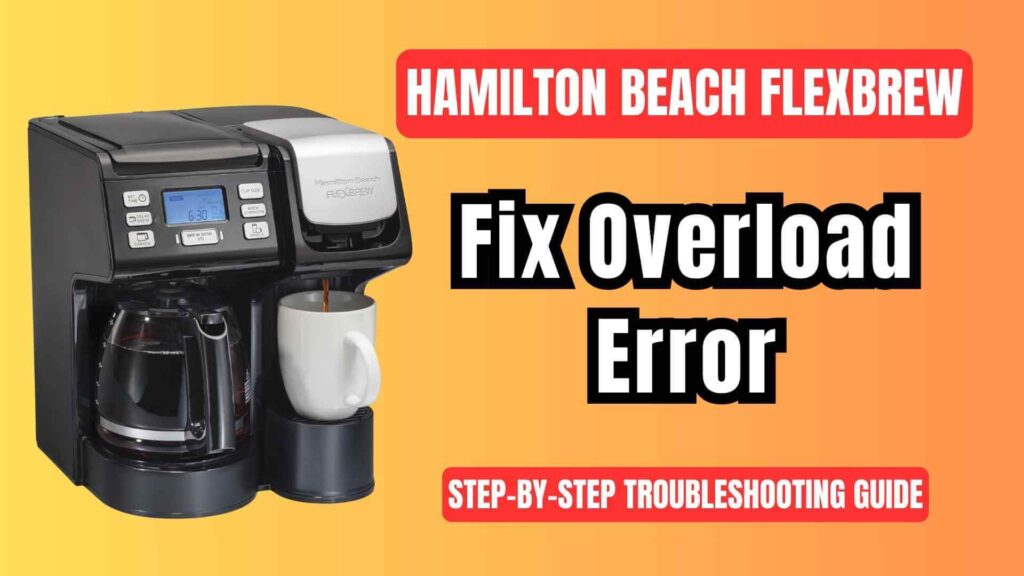
Why Overload Happens on Your FlexBrew — Common Causes & Fixes
Common Causes of Overload Error on FlexBrew
Clogged Piercing Needle (K‑cup side)
- Why it matters: The single‑serve side of FlexBrew uses a sharp needle to puncture pods and deliver water. Over time, coffee grounds, oils, and residue can build up in or around that needle — restricting flow.
- Solution: Remove the needle assembly (usually under a gray removable needle holder). Use a straightened paperclip or thin wire to gently clear the needle’s hole. For a deeper clean, soak the needle in white vinegar overnight to dissolve residue.
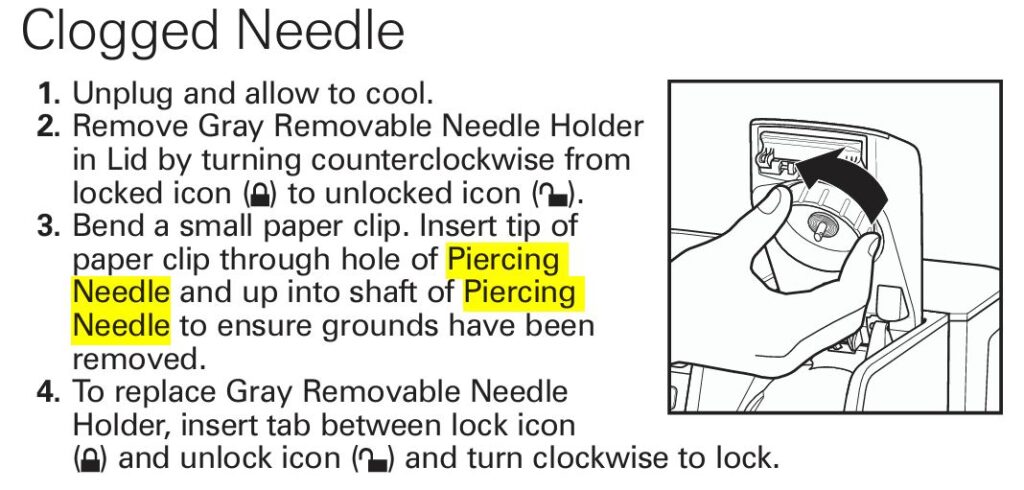
“The primary cause of the overload error is due to a clogged top needle on the k‑cup side.”
Overpacked or Too-Finely Ground Coffee (Ground‑Coffee Side)
- Why it matters: If you overfill the brew basket or use very fine grounds, water might struggle to pass through. This increased resistance can cause pressure buildup and trigger the overload error.
- Solution: Use the recommended amount — typically 1–2 tablespoons per cup. Avoid packing grounds tightly; lightly fill or stir grounds to allow water flow. If you grind your own beans, use a “medium/coarse for drip” grind rather than very fine.
Incompatible or Improper Pod/Filter Use
- Why it matters: Using pods that are too large, badly shaped, or not designed for your FlexBrew may hamper water flow. Similarly, using incorrect filters or misplacing them can cause flow issues or blockages.
- Solution: Always use pods and filters specified (or recommended) for your FlexBrew model. Avoid third‑party pods/filters with unknown specifications if possible.
Water Reservoir / Water Flow Issues or Airlocks
- Why it matters: If the reservoir is not seated properly, or if there’s air trapped in the water lines, the pump may struggle to draw water — leading to overload. Mineral buildup inside water lines can also reduce flow.
- Solution: Ensure the water reservoir is firmly placed and filled. If the machine has run dry, re‑prime by pressing the brew button a few times after refilling. Periodically descale the machine using vinegar (or commercial descaler) to clear mineral deposits.
Internal Blockage or Scale / Mineral Buildup
- Why it matters: Hard water or infrequent cleaning can cause mineral deposits inside internal tubing, heating elements, or flow paths — creating resistance or blockages.
- Solution: Run regular descaling cycles. A common method: fill reservoir with 50/50 white vinegar and water, run a brew cycle (or partial cycle), let sit, then flush thoroughly with fresh water. Follow up with 2–3 cycles of clean water to rinse.
Temporary Electrical or Sensor Glitch / Overheat Reset Needed
- Why it matters: Sometimes the overload message may appear due to a temporary malfunction — e.g., the motor overworked or a sensor tripped.
- Solution: Unplug the coffee maker, wait 10–15 minutes to let it cool, then plug it back in. This resets the machine. After resetting, run a simple water-only brew cycle to check if the problem persists.
Step‑by‑Step Troubleshooting Guide
| Step | Action | Purpose |
|---|---|---|
| 1 | Unplug and let the machine cool | Clears temporary sensor/motor overloads |
| 2 | Inspect & clean the piercing needle (K-cup side) | Removes blockages from coffee grounds or oils |
| 3 | Check coffee grounds & filter basket (ground‑coffee side) | Prevents overpacking which restricts water flow |
| 4 | Ensure correct pods/filters are used | Avoids fit/mismatch issues that impede flow |
| 5 | Check water reservoir + lines; re‑prime pump if necessary | Fixes airlocks or mis‑seated reservoir causing flow issues |
| 6 | Descale machine (vinegar or commercial descaler) | Eliminates mineral buildup that blocks flow |
| 7 | Run a water‑only brew cycle / test run | Verifies that cleaning/fixes resolved the overload problem |
Additional Tips & Maintenance to Prevent Future Errors
- Perform a full cleaning (needle, basket, pod holder) every 1–2 weeks if you use FlexBrew frequently.
- Use filtered or soft water to minimize mineral buildup.
- Avoid overpacking coffee grounds or cramming pods.
- After descaling or deep cleaning, always flush the system with 2–3 cycles of clean water.
- If using the single‑serve side often, regularly check and clean the pod‑holder’s removable needle holder; ensure the black rubber seal around the needle is intact.
FAQ — Frequently Asked Questions
What exactly does “overload” mean on FlexBrew?
It means the machine detects excessive resistance or load on the pump/motor — typically due to a blockage or water‑flow obstruction.
I cleaned the needle but still get overload. What next?
Try descaling the machine, ensure the water reservoir is seated properly, and run a water‑only brew cycle to flush out any hidden blockages or airlocks.
Can using too much coffee cause overload?
Yes — overpacking the basket or using too fine grounds can restrict water flow, causing pressure buildup and triggering the error.
Could the overload error be a faulty motor or pump?
Possibly, especially if cleaning and descaling don’t help. In that case, internal inspection or professional service may be needed.
How often should I clean or descale my FlexBrew?
Ideally every 1–2 weeks if used often; a thorough descaling once a month (or more if water is hard) helps prevent mineral buildup and blockages.
Can air trapped in water lines cause overload?
Yes — airlocks can prevent proper water flow, making the pump work harder and triggering overload. Re‑priming the pump or re‑seating the reservoir can help.
Is it safe to perform a deep cleaning or disassembly myself?
Cleaning removable parts and descaling is safe and recommended. Fully disassembling internal components (e.g., to access internal tubing or pumps) is not generally recommended unless you have technical expertise; doing so may void warranty.
Regular cleaning and proper use (correct coffee amount, compatible pods/filters, filtered water) will help prevent overload errors from returning and keep your FlexBrew brewing smoothly for years.
Summary
An “overload error” on your Hamilton Beach FlexBrew is usually not a sign of permanent failure — most of the time it’s simply a signal that your coffee maker is struggling against a blockage, flow restriction, or pump overload. The good news is that with a little maintenance — cleaning the piercing needle, checking grounds and filters, descaling, ensuring proper reservoir seating — you can usually restore your machine to full working order.

0 Comments