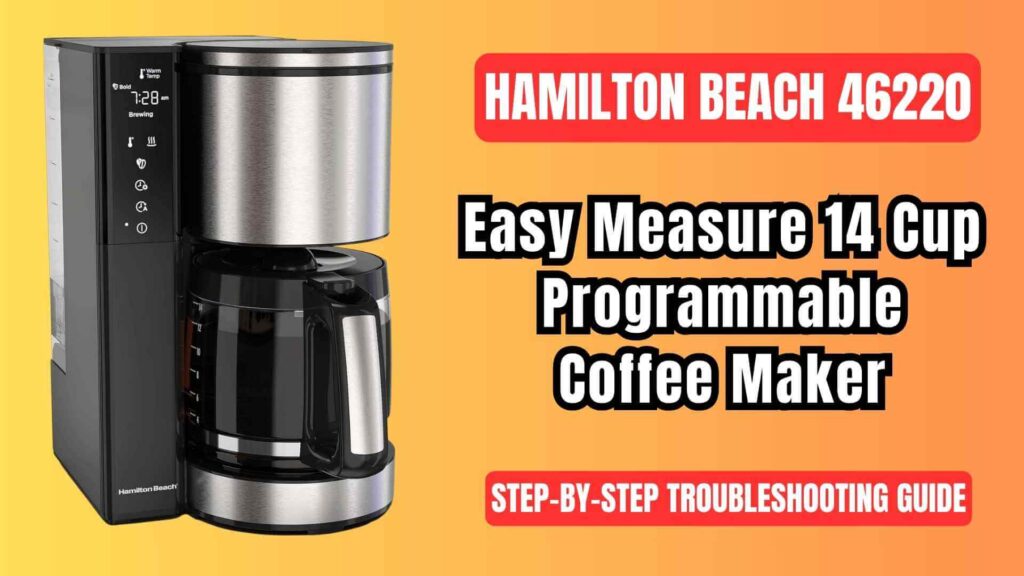
The Hamilton Beach 46220 Easy Measure 14-Cup Coffee Maker is packed with features designed to make your coffee brewing experience easier and more enjoyable. From the easy-to-read measurement window to the customizable brew strength settings (Classic, Bold, Robust), this coffee maker is built to fit a variety of preferences. The Pause ‘N Serve feature allows you to pour a cup of coffee before the brewing cycle finishes, and the large water reservoir can brew up to 14 cups at once.

However, even with such a reliable design, issues can occur from time to time. Whether it’s a slow brew, overflowing filter, or coffee that just doesn’t taste right, this guide will walk you through each problem, its causes, and solutions, all based on the authentic Hamilton Beach 46220 user manual. By understanding how your coffee maker works and how to troubleshoot common problems, you can extend the life of your appliance and enjoy consistently great coffee.
Common Hamilton Beach 46220 Programmable Coffee Brewer Issues & their Solutions
Coffee Maker Not Brewing or Not Turning On
If your Hamilton Beach 46220 Easy Measure coffee maker is not brewing or not turning on, the issue could be related to a variety of factors, from power supply problems to water reservoir issues.
Possible Causes and Solutions:
- Water Reservoir is Empty:
- The coffee maker cannot brew coffee if there is not enough water in the reservoir. Ensure that you have filled the reservoir with water up to the minimum fill line (10 oz or 295 mL) or maximum fill line (70 oz or 2.07 L).
- Check that the water reservoir is properly seated in the coffee maker. If the reservoir isn’t fully inserted, it can prevent the machine from turning on.
- Power Supply Issues:
- Unplugged Unit: Sometimes, the coffee maker is simply not plugged in. Double-check the power cord and plug to ensure they are securely connected to the outlet.
- Power Surge or Outage: A recent power surge or outage can interrupt your coffee maker’s functionality. If this happens, unplug the coffee maker, wait for a few minutes, and then plug it back in.
- Clock Reset: After a power interruption, the clock on the coffee maker may reset to “0:00”. Reset the time by pressing the Time button to adjust the hour and minutes.
- Brew Cycle is Interrupted:
- If the Pause ‘N Serve function was used during the brewing cycle, it could disrupt the process. Ensure that the carafe is placed back within 20 seconds to prevent overflow and allow the coffee maker to resume brewing.
If none of these solutions work, check for any visible error messages or icons on the LED display, such as the clean or filter icon, which could indicate other maintenance needs.
Coffee Brewing Slowly or Overflowing
Another common issue is coffee brewing too slowly or the filter basket overflowing during the brewing process. Overflowing coffee is messy and can create a frustrating brewing experience.
Possible Causes and Solutions:
- Brew Strength Settings:
- The Bold and Robust settings are designed for a slower brewing process to optimize the coffee’s flavor. If you prefer a quicker brew, select the Classic setting instead.
- For smaller quantities of coffee (1-4 cups), be sure to select the 1–4 Cups option to adjust the brewing time accordingly.
- Excessive Coffee Grounds:
- Overfilling the coffee filter basket can cause the coffee to brew slowly or overflow. The recommended amount is 1 tablespoon (5 g) of ground coffee per cup of water.
- When brewing decaffeinated or flavored coffee, or using a finer grind, reduce the amount of coffee grounds to avoid clogs. Finely ground coffee can cause blockages, slowing down the brewing process.
- Dirty Coffee Maker:
- A buildup of coffee oils or mineral deposits from hard water can cause slow brewing. Clean the coffee maker regularly as per the cleaning instructions below.
- Pause ‘N Serve Feature:
- If you use the Pause ‘N Serve feature to pour a cup of coffee before the brew cycle is finished, ensure that the carafe is placed back on the Keep Warm Plate within 20 seconds. If the carafe is left off for longer, the filter basket could overflow, causing a mess.
Coffee Tastes Bad
Bad-tasting coffee can stem from several factors, including the quality of your coffee grounds, the water quality, or the cleanliness of your coffee maker.
Possible Causes and Solutions:
- Coffee Maker Needs Cleaning:
- Over time, coffee oils and mineral deposits from the water can accumulate inside the coffee maker, affecting the flavor of your coffee. To restore good flavor, clean your coffee maker regularly. This should be done at least once a month or more often if you have hard water.
- To clean, fill the water reservoir with 2 cups (473 mL) of white vinegar and run a brew cycle. After 30 seconds, turn off the machine and let it sit for 30 minutes. Then, restart the cycle and allow it to complete.
- Coffee Grounds Size:
- Using coffee grounds that are too coarse or too fine can impact the flavor. Coarse grounds can result in weak coffee, while fine grounds can clog the filter and lead to over-extraction, making the coffee taste bitter.
- Use medium-ground coffee for optimal taste. If you’re grinding your own beans, adjust your grinder to a medium setting for the best flavor.
- Coffee-to-Water Ratio:
- Adjusting the coffee-to-water ratio can help achieve the perfect strength. For standard coffee, use 1 tablespoon (5 g) of coffee grounds per cup of water. If your coffee is too strong or weak, experiment with this ratio to find your preferred taste.
- If brewing decaf or flavored coffee, reduce the amount of coffee grounds slightly to prevent overflow or bitterness.
- Poor Quality or Stale Coffee:
- The quality of coffee beans or grounds plays a major role in the taste of your coffee. Use fresh coffee beans or purchase pre-ground coffee with a long expiration date. Ground coffee becomes stale much quicker than whole beans, so if possible, grind your coffee just before brewing.
- Water Quality:
- The water you use has a direct effect on the taste of your coffee. Filtered water or bottled water will yield better results than regular tap water, which can contain minerals or chlorine that affect the taste.
Coffee Grounds Between Paper Filter and Basket
Another common issue is coffee grounds slipping between the paper filter and the basket, which can lead to a messy brew.
Possible Causes and Solutions:
- Improper Paper Filter Placement:
- Before adding coffee grounds, make sure the paper filter is properly positioned in the filter basket. The paper should fully line the basket, and the edges should be flush against the sides of the basket to prevent grounds from slipping through.
- If using a cone-shaped filter, fold the bottom of the filter to ensure it fits snugly against the basket. If the filter isn’t positioned correctly, the grounds may slip through and make a mess.
- Low-Quality Paper Filters:
- Some low-quality filters may be more prone to tearing or not fitting properly in the basket. To avoid this, use high-quality filters specifically designed for your coffee maker, such as #4 cone-style filters.
Water Filter Indicator Light On
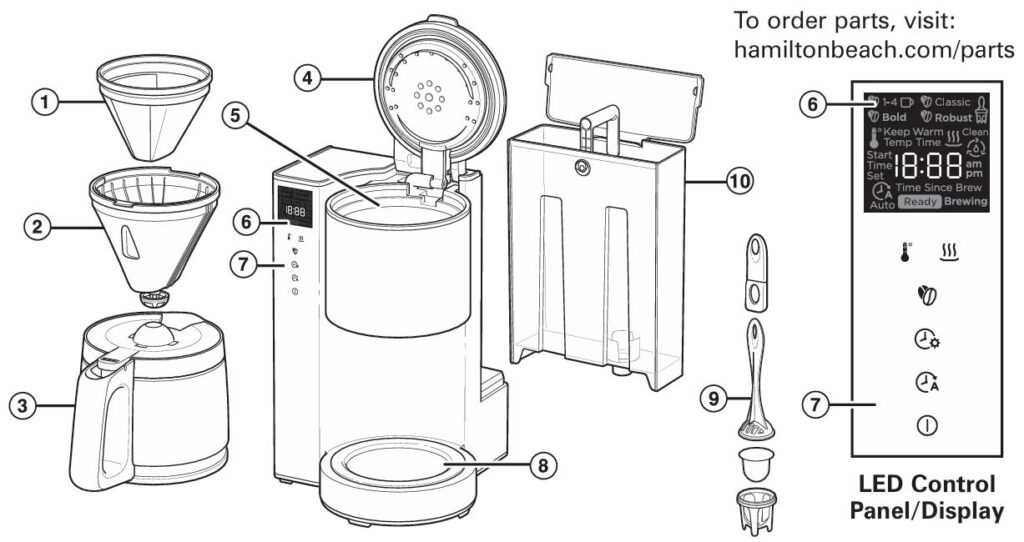
The Water Filter indicator light on the LED control panel of the Hamilton Beach 46220 will light up when it’s time to change the water filter.
How to Replace the Water Filter:
- Soak the Filter: Soak the water filter pod in water for 15 minutes before installation.
- Insert the Filter Pod: Place the soaked filter into the bottom of the water filter holder and snap it into place.
- Install the Water Filter: Put the filter holder into the water reservoir before using the coffee maker again.
Here’s a short table summarizing the common problems with the Hamilton Beach 46220 coffee maker and their solutions:
| Problem | Solution |
|---|---|
| Coffee Maker Not Brewing/Turning On | Ensure the water reservoir is filled, check power supply, reset clock after a power surge. |
| Coffee Brewing Slowly or Overflowing | Reduce coffee grounds, use medium grind, select Bold or Robust setting, clean the coffee maker. |
| Coffee Tastes Bad | Clean the coffee maker, use filtered water, adjust coffee-to-water ratio, use fresh coffee grounds. |
| Coffee Grounds Between Filter and Basket | Properly position the paper filter, use high-quality filters, ensure the filter is fully opened. |
| Water Filter Indicator Light On | Replace the water filter after soaking the filter pod in water for 15 minutes. |
Cleaning and Maintenance Tips
Regular cleaning is essential for keeping your Hamilton Beach coffee maker in peak condition and ensuring it brews great coffee every time.
Descaling and Cleaning Process
- Step 1: Remove the water filter (if used) from the reservoir.
- Step 2: Fill the water reservoir with 2 cups (473 mL) of white vinegar. Vinegar is effective in removing mineral buildup that can clog the machine.
- Step 3: Press the Power (ON) button to begin a brew cycle. Let the vinegar run for 30 seconds, then stop the cycle and let the vinegar sit in the machine for 30 minutes.
- Step 4: After 30 minutes, restart the brew cycle to complete the cleaning process.
- Step 5: Rinse the coffee maker by running 2-3 more brew cycles with clean water to remove any vinegar residue.
When to Seek Professional Help
If your Hamilton Beach 46220 Easy Measure coffee maker is still malfunctioning after performing all the above troubleshooting steps, it may be time to contact Hamilton Beach Customer Service for further assistance.
When to Contact Support:
- Electrical Issues: If the coffee maker is not turning on after troubleshooting or is experiencing electrical issues.
- Water Reservoir Issues: If the water reservoir is leaking or not seated properly, preventing brewing.
- Control Panel Malfunctions: If the LED display is malfunctioning or showing error codes that cannot be cleared.
Visit Hamilton Beach’s customer service website for more details on warranty claims and repairs.
Frequently Asked Questions (FAQs)
Why is my coffee maker brewing so slowly?
Slow brewing may occur if the Bold or Robust brew strength is selected. These settings result in slower brewing to extract maximum flavor. Additionally, using fine coffee grounds or too many grounds can clog the filter, slowing down the process. Adjust your settings and reduce the amount of coffee grounds to improve the brew time.
How do I reset my Hamilton Beach coffee maker after a power surge?
After a power surge or outage, unplug the coffee maker for a few minutes. Plug it back in and reset the time by pressing the Time button to adjust the hour and minutes.
How often should I clean my coffee maker?
Clean your coffee maker at least once a month. If you live in an area with hard water, clean it more frequently—ideally once a week—to prevent mineral buildup and ensure optimal brewing performance.
Can I use a generic filter with the Hamilton Beach 46220?
While you can use other paper filters, it is recommended to use #4 cone-shaped filters for the best fit and performance. Ensure that the paper filter is properly positioned in the basket to avoid coffee grounds slipping through.

0 Comments